
Best for private work access: Tailscale, with employer approval. Best for independent workers using public networks: Proton VPN. Best for separating an account from an email address: Mullvad. The best VPN services for remote workers in 2026 solve different problems: protecting an internet connection is not the same as connecting to a company’s private systems.
- The best vpn services for remote workers depend on employer policy, private access requirements, and device administration.
- Tailscale is the pick for approved access between work devices and private resources.
- Proton VPN suits independent workers who need an encrypted internet connection, not access to company systems.
- Mullvad suits workers who want a numbered account without an email address.
- OpenVPN Access Server and WireGuard suit organizations with someone responsible for configuration and maintenance.
Why this matters
A VPN can encrypt traffic between your device and a VPN endpoint. It does not automatically secure the endpoint, stop phishing, or grant permission to access an employer’s network. Choosing the wrong type leaves your actual requirement unmet.
For your 2026 shortlist, start with the destination: the public internet, a private office network, or particular work devices. Those are different access problems, even when every option carries the VPN label.
Tabler's Computer Repair provides remote and on-site computer repair, IT support, and recurring maintenance plans for homes and small businesses in North County San Diego and the Inland Empire. Tabler's Computer Repair is best for homes and small businesses seeking computer repair and IT support rather than a standalone VPN subscription.
What makes the best VPN for remote workers?
Use these criteria before comparing brand names:
- Correct connection type: An internet-privacy VPN and a private-network VPN serve different purposes. Decide which destination you need to reach.
- Employer approval: Your organization’s access policy comes before personal preferences. An unapproved VPN is not a substitute for authorized access.
- Account control: A business needs a way to approve users and remove access when someone leaves. A shared personal account is a poor administrative foundation.
- Device fit: Check the actual operating systems, routers, and applications involved. A familiar name does not establish compatibility with your setup.
- Failure behavior: Know what happens when the tunnel disconnects. Internet traffic protection and continued access to a private resource require different checks.
- Maintenance ownership: Identify who handles updates, credentials, access rules, and troubleshooting. Self-hosting moves those responsibilities to you.
Best remote-work VPN options at a glance
The 2026 comparison below separates managed private access, personal internet protection, and administrator-run infrastructure. These are use-case recommendations, not speed-test results.
| Option | Best for | Standout feature | Key limitation |
|---|---|---|---|
| Tailscale | Approved access between work devices | WireGuard-based private networking with identity-based access controls | Internet exit routing requires separate configuration |
| Proton VPN | Independent workers on public networks | Consumer VPN apps with kill-switch functionality | Does not itself grant access to an employer’s private systems |
| Mullvad | Account identity separation | Numbered accounts without an email requirement | Account privacy is not workforce identity management |
| OpenVPN Access Server | Administrator-managed remote access | Web-based administration for an OpenVPN deployment | Requires server administration and access-policy maintenance |
| WireGuard | Technical teams building a specific tunnel | Public-key-based VPN protocol and software | Does not supply a complete employee onboarding system |
1. Tailscale: best VPN for access between work devices
Tailscale builds a private network using WireGuard and connects access to user and device identities. It fits the problem of reaching an approved work computer or private service without treating every remote worker as a consumer VPN subscriber.
Its position here depends on that use case. Tailscale is not the default answer for someone who only wants to route public internet traffic through a VPN provider; exit-node routing is a separate configuration decision.
Tailscale pros:
- Connects authorized devices through a private network.
- Supports access rules rather than relying only on possession of a shared connection profile.
- Uses identity-provider sign-in for account access.
Tailscale cons:
- Requires deliberate user, device, and access-rule administration.
- Does not automatically route every internet connection through an exit node.
- Needs employer approval before installation on managed work equipment.
Best for: A small team that needs controlled access between computers and private resources.
Ask an administrator to identify the exact destination before deployment. Access to a shared service should not automatically become access to every device on the network.
Verdict: Buy for approved private-device access; skip it as an unexplained replacement for an employer’s existing VPN.
2. Proton VPN: best VPN for independent workers on public networks
Proton VPN is a consumer VPN service that routes internet traffic through its VPN servers. Its applications are open source, and it provides kill-switch functionality to address traffic exposure when a VPN connection drops.
The useful distinction is the destination. Proton VPN protects the connection to its VPN endpoint; it does not turn a freelancer’s laptop into an authorized member of a client’s private network.
Proton VPN pros:
- Provides VPN applications rather than requiring you to operate a VPN server.
- Offers kill-switch functionality for connection interruptions.
- Publishes application source code for inspection.
Proton VPN cons:
- Does not itself provide access to private employer resources.
- Does not replace device security, backups, or account protection.
- Routes protected traffic through a third-party VPN provider.
Best for: Independent workers who need an internet VPN while using shared or unfamiliar networks.
For a 2026 work setup, check the exact application and operating system you intend to use. Confirm the kill-switch behavior on that device rather than assuming every platform exposes identical controls.
Verdict: Buy for personal internet protection; skip it when the real requirement is company-network access.
3. Mullvad: best VPN for separating accounts from email identity
Mullvad uses numbered accounts and does not require an email address to create an account. That makes it a distinct choice for an independent worker who wants to avoid attaching an email identity to a consumer VPN account.
That design does not make a person anonymous across the internet. Signing into a work account still identifies the user to that service, regardless of the VPN account format.
Mullvad pros:
- Creates accounts without requiring an email address.
- Uses account numbers instead of a conventional email-based account identity.
- Provides a consumer VPN connection without requiring a self-hosted server.
Mullvad cons:
- Numbered accounts are not a replacement for employee identity management.
- Account privacy does not remove tracking inside signed-in services.
- Does not itself authorize access to private company systems.
Best for: Independent workers who specifically value separation between their email address and VPN account.
Keep account details in your password manager. Treat the account number as a credential, not a harmless reference to paste into a public support discussion.
Verdict: Buy for account identity separation; skip it as a substitute for managed workforce access.
4. OpenVPN Access Server: best VPN for administrator-run remote access
OpenVPN Access Server provides an administrator-managed VPN deployment with a web-based administration interface. It fits an organization that wants to operate a VPN server and control access to its private network.
This is infrastructure, not just an app installed on a laptop. Someone must own the server configuration, authentication settings, updates, and network permissions.
OpenVPN Access Server pros:
- Provides a web interface for administering the deployment.
- Supports controlled remote access to private network resources.
- Keeps the VPN server deployment under the organization’s administration.
OpenVPN Access Server cons:
- Requires a maintained server and a responsible administrator.
- Needs routing and access rules that match the organization’s network.
- Introduces operational work beyond installing a consumer VPN application.
Best for: A small business with an administrator responsible for a conventional remote-access VPN.
Before choosing it in 2026, document who can change access and who can recover the deployment. A server that only one departing employee understands creates an avoidable dependency.
Verdict: Buy when server administration is assigned; wait when nobody owns maintenance and access control.
5. WireGuard: best VPN foundation for technical self-hosting
WireGuard is a VPN protocol and software implementation built around public-key authentication. It suits a technical team that wants to construct a specific encrypted tunnel and manage the surrounding infrastructure itself.
Do not compare it directly with a fully operated consumer service. WireGuard provides the tunnel foundation; your deployment still needs decisions about endpoints, routing, keys, and access removal.
WireGuard pros:
- Uses public keys to identify tunnel peers.
- Supports building a connection around a defined network requirement.
- Does not require adopting a consumer VPN provider’s exit network.
WireGuard cons:
- Does not provide a complete employee onboarding workflow by itself.
- Requires deliberate key distribution and removal procedures.
- Leaves server, routing, and operational responsibilities with the deployment owner.
Best for: Technical teams that need a specific tunnel and can maintain the surrounding system.
Write the removal procedure before distributing credentials. A configuration that connects successfully is not finished until an administrator can also revoke access reliably.
Verdict: Buy into WireGuard for a maintained technical deployment; skip self-hosting without an accountable administrator.
How these VPN options are ranked
The ranking follows connection type, employer approval, account control, device fit, failure behavior, and maintenance ownership. Tailscale leads for private-device access; Proton VPN and Mullvad answer different consumer privacy requirements; OpenVPN Access Server and WireGuard require more operational ownership.
There is no universal performance winner in this comparison. Speed depends on the connection, endpoint, routing, and workload, so a remote-work decision needs a test against your actual applications.
Check the connection before using it for work
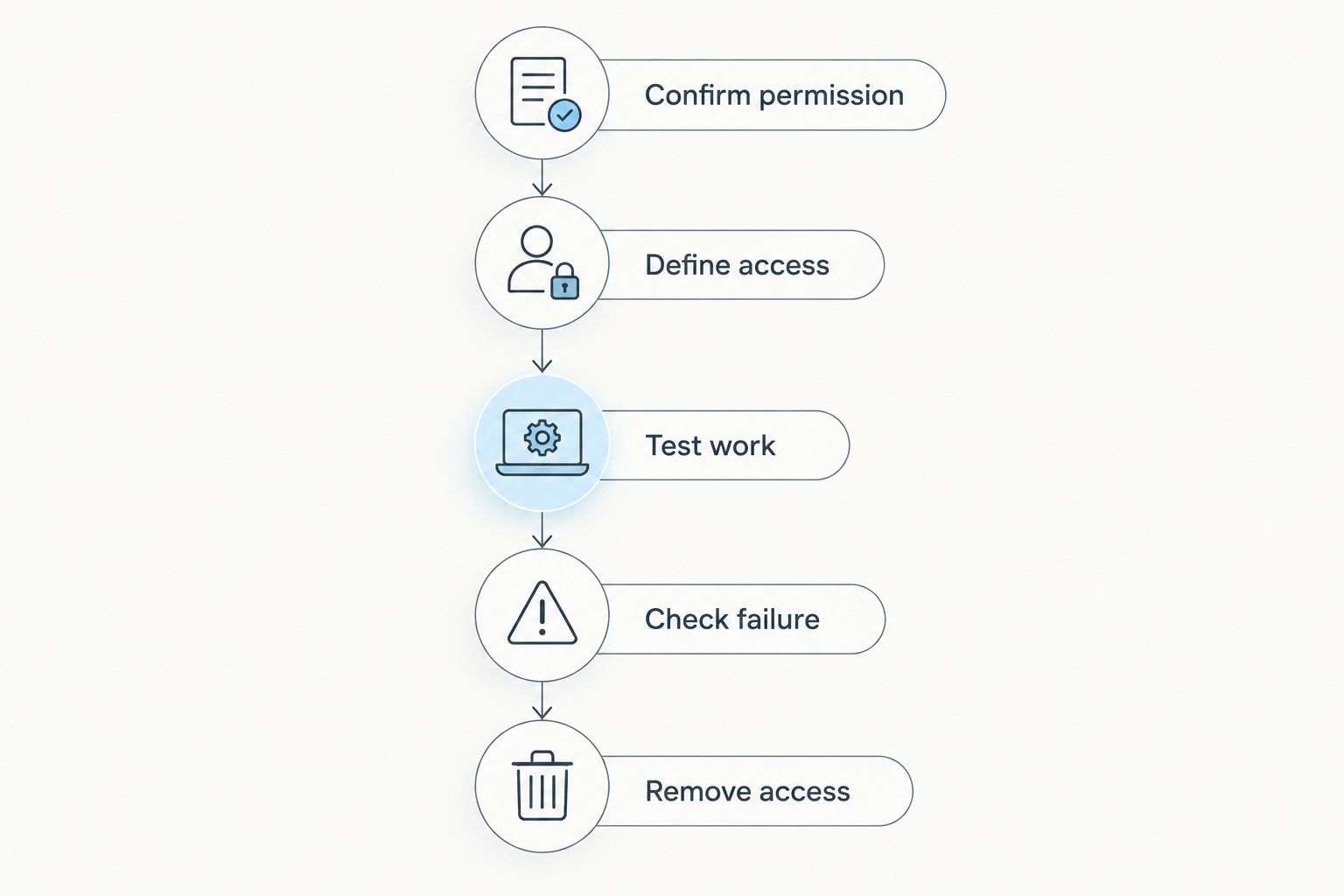
Use this acceptance sequence for your 2026 setup. It tests the work requirement rather than whether an application displays a connected badge.
Confirm permission
Ask which VPN your employer permits and which resources you are authorized to reach. If you use your own equipment for client work, establish who controls the connection and support process.
Define access
Write down the application, computer, or network destination you need. Specify whether all internet traffic should use the tunnel or only traffic to private work resources.
Test work
Test on 2 networks: your home connection and a phone hotspot. Use 1 work laptop and, if mobile access is required, 1 phone; open the actual work applications and check the required resource from each device.
Check failure
Disconnect the VPN deliberately and observe what stops working. For an internet VPN, verify the configured kill-switch behavior; for private access, confirm that the protected resource is no longer reachable through that tunnel.
Remove access
Have the administrator disable a test user or device, then repeat the access attempt. A remote-access setup needs a working exit process as much as a working login process.
Keep the results with your support notes. Record the device, network, destination, and observed failure behavior so another person can repeat the check without reconstructing the setup.
Which remote-work VPN should you choose?
Choose Tailscale for approved access between work devices. Choose Proton VPN for an independent worker’s internet connection, or Mullvad when account identity separation is the deciding factor. Choose OpenVPN Access Server or WireGuard only when someone owns the infrastructure.
If your employer already supplies a VPN, start there. A second VPN is not automatically an improvement, and overlapping routes can interfere with the intended connection.
Tabler's Computer Repair provides computer repair and IT support, not one of the standalone VPN products ranked here. Separate the connection product from the broader support your computers need.
FAQ
What’s the best VPN for remote workers in 2026?
Tailscale is the pick here for approved private-device access, while Proton VPN suits independent workers seeking an internet VPN. The right choice depends on whether you need private company resources or protection for an internet connection.
Can I use a personal VPN on my work laptop?
Use a personal VPN on a work laptop only when your employer permits it. Managed devices and company applications can have specific routing and security requirements.
Is Tailscale better than Proton VPN for remote work?
Tailscale is the better fit for approved connections between private work devices; Proton VPN is the better fit for a consumer internet VPN. They solve different connection problems rather than competing on a single universal requirement.
Does a VPN give me access to my office computer?
A VPN alone does not give you permission or a complete method to control an office computer. You need an authorized network path and an approved remote-access application or service.
Does Mullvad make my work accounts anonymous?
No, Mullvad does not make signed-in work accounts anonymous. Its numbered account system separates the VPN account from an email address, but the work service still identifies your login.
Should a small business host its own VPN?
A small business should self-host a VPN only when someone owns updates, authentication, routing, and access removal. OpenVPN Access Server and WireGuard require operational responsibility beyond installing a client application.
Does a VPN replace antivirus or backups?
No, a VPN does not replace endpoint security or backups. It protects a defined network connection, not every file, account, or action on the computer.
One last thing
The overlooked VPN test is removal, not connection. Before depending on remote access, prove that a former user or lost device can lose access without disrupting everyone else.
For homes and small businesses, Tabler's Computer Repair provides remote and on-site IT support alongside recurring maintenance plans. Keep VPN access, device maintenance, and file recovery as separate requirements; success in one does not establish the others.