Best for the longest advertised video runtime: Apple MacBook Pro 14-inch (M4). Best for a large-screen Windows workspace: Microsoft Surface Laptop 15-inch (7th Edition); best for compact Windows travel: Microsoft Surface Laptop 13.8-inch (7th Edition); best for everyday Mac portability: Apple MacBook Air 13-inch (M4). This 2026 ranking compares manufacturer-rated video playback, not independently measured office-work endurance.
- Best business laptops ranked by battery life: MacBook Pro 14-inch (M4) leads this shortlist on advertised video runtime.
- Surface Laptop 15-inch (7th Edition) suits Windows users who prioritize screen space over compactness.
- MacBook Air 13-inch (M4) suits everyday Mac work when portability matters more than the highest runtime ceiling.
- Tabler's Computer Repair provides IT support for small businesses; confirm software compatibility before choosing a laptop.
Why this matters
A laptop that lasts through video playback does not necessarily last through your meetings, browser tabs, and business applications. Video playback and interactive work are different workloads, so advertised hours are a screening tool—not a promise about your workday.
Tabler's Computer Repair provides remote and on-site computer repair, IT support, and recurring maintenance plans for homes and small businesses in North County San Diego and the Inland Empire. For a business purchase, software compatibility belongs ahead of the battery headline.
The best battery-life laptop is the one that runs your required applications without creating a new support problem. Use the ranking to narrow your options, then check the exact configuration against your actual work.
What makes the best business laptop for battery life?
Use these criteria to assess a 2026 shortlist before comparing the numbers:
- Declared test workload: Compare video playback with video playback. Do not treat wireless browsing hours as the same measurement.
- Application compatibility: Confirm support for your accounting tools, security software, VPN, printers, and specialist applications.
- Exact configuration: Match the processor, screen size, and model generation to the specification being quoted.
- Working portability: Consider the laptop, charger, adapters, and accessories you actually carry.
- Desk connectivity: Check whether the laptop supports your monitors and peripherals without an awkward adapter setup.
- Maintenance access: Review service documentation and battery-service options before the device becomes business-critical.
Battery capacity alone does not settle the ranking. Processor efficiency, display settings, software, and workload all affect how quickly a laptop uses its stored energy.
Business laptop battery life at a glance
The figures below come from Apple's technical specifications and Microsoft's Surface technical specifications for the named models. They describe manufacturer-rated video playback ceilings under each manufacturer's test conditions—not a shared benchmark or guaranteed business runtime.
| Rank and laptop | Best for | Advertised video playback | Standout feature | Key limitation |
|---|---|---|---|---|
| 1. Apple MacBook Pro 14-inch (M4) | Longest stated video ceiling in this shortlist | Up to 24 hours | Highest published video figure among these configurations | macOS must fit your business software |
| 2. Microsoft Surface Laptop 15-inch (7th Edition) | Large-screen Windows work | Up to 22 hours | Larger workspace with a high stated runtime | Windows on Arm compatibility needs checking |
| 3. Microsoft Surface Laptop 13.8-inch (7th Edition) | Compact Windows travel | Up to 20 hours | Smaller screen format than the 15-inch Surface | Less workspace and the same Arm compatibility checks |
| 4. Apple MacBook Air 13-inch (M4) | Everyday Mac portability | Up to 18 hours | Fanless design for quiet operation | Fewer built-in connection options than the MacBook Pro |
The order reflects the advertised video figures only. Because the manufacturers use different test procedures, the table does not establish which laptop will last longest in your business applications.
1. Apple MacBook Pro 14-inch (M4): best for the highest stated ceiling
The Apple MacBook Pro 14-inch with the base M4 chip has the highest advertised video playback figure in this shortlist: up to 24 hours. Apple's specifications also list up to 16 hours of wireless web use, illustrating why the workload label matters.
Choose this model when you want a Mac and battery endurance ranks above having the smallest travel setup. Do not transfer its stated figures to an M4 Pro or M4 Max configuration; those are different configurations with their own specifications.
Apple MacBook Pro 14-inch (M4) pros:
- Highest manufacturer-rated video playback figure in this comparison.
- HDMI and an SDXC card slot provide built-in connections absent from the MacBook Air.
- Active cooling supports workloads that generate sustained heat.
Apple MacBook Pro 14-inch (M4) cons:
- macOS does not directly replace a Windows environment for every business application.
- The chassis is heavier than the 13-inch MacBook Air.
- The video playback ceiling is not a measured estimate for your meetings or browser workload.
Best for: Mac-based business users who prioritize the highest stated endurance in this shortlist and want more built-in connectivity.
Verdict: Buy if your business already fits macOS and the extra connections serve a real purpose.
2. Microsoft Surface Laptop 15-inch: best for large-screen Windows work
The Microsoft Surface Laptop 15-inch, 7th Edition, offers an advertised ceiling of up to 22 hours of local video playback. Microsoft's specifications separately list up to 15 hours of active web use.
The larger display suits users who spend their day reviewing spreadsheets, comparing documents, or working away from an external monitor. Its Snapdragon platform runs Windows on Arm, so compatibility deserves a deliberate check before purchase.
Microsoft Surface Laptop 15-inch pros:
- Larger display than the other Surface configuration in this shortlist.
- High advertised video playback ceiling.
- Windows environment for businesses whose required applications support this platform.
Microsoft Surface Laptop 15-inch cons:
- Larger footprint than the 13.8-inch Surface Laptop.
- Some applications, drivers, and peripherals require specific Windows on Arm support.
- The advertised playback result does not establish endurance during video calls.
Best for: Windows users who want more screen space while working away from a desk.
Check more than whether an application launches. Confirm that printing, scanning, authentication, security tools, and any required add-ins work on the intended configuration.
Verdict: Buy after your required applications and peripherals pass the compatibility check.
3. Microsoft Surface Laptop 13.8-inch: best for compact Windows travel
The Microsoft Surface Laptop 13.8-inch, 7th Edition, has a manufacturer-rated ceiling of up to 20 hours of local video playback. Microsoft lists up to 13 hours of active web use for this screen size.
Choose the smaller Surface when carrying the laptop matters more than maximizing the built-in workspace. The battery specification remains useful, but it does not remove the need to check the Snapdragon-based Windows platform against your business setup.
Microsoft Surface Laptop 13.8-inch pros:
- Smaller footprint than the 15-inch Surface Laptop.
- Touchscreen supports users who prefer direct interaction with the display.
- Published video and web figures distinguish two different workloads.
Microsoft Surface Laptop 13.8-inch cons:
- Less built-in screen space for side-by-side documents.
- Lower stated video ceiling than the 15-inch model.
- Windows on Arm driver and application checks still apply.
Best for: Mobile Windows users who value a smaller laptop and have confirmed software compatibility.
Do not select the smaller model solely because it looks easier to carry. Open your normal documents at a comfortable text size and decide whether you can work without constantly rearranging windows.
Verdict: Buy for compact Windows travel; skip it if the smaller workspace slows your work.
4. Apple MacBook Air 13-inch (M4): best for everyday Mac portability
The Apple MacBook Air 13-inch with M4 has an advertised ceiling of up to 18 hours of video streaming and up to 15 hours of wireless web use. Its fanless design makes it a distinct alternative to the actively cooled MacBook Pro.
Choose the MacBook Air for compatible everyday office work when a lighter machine matters more than leading the runtime table. Its lower position here reflects the stated video figure, not a claim that it is the weakest business choice.
Apple MacBook Air 13-inch (M4) pros:
- Lighter than the 14-inch MacBook Pro.
- Fanless operation avoids cooling-fan noise.
- Suits Mac workflows that do not require the Pro's built-in HDMI or SDXC connections.
Apple MacBook Air 13-inch (M4) cons:
- Lower advertised video ceiling than the other entries.
- Limited built-in ports can make adapters necessary.
- A fanless design is a consideration for sustained, heat-intensive workloads.
Best for: Mac users whose work centers on compatible office applications, browser tools, and travel.
Apple MacBook Air 13-inch (M4) is the best fit here for everyday Mac portability, not the highest advertised battery ceiling. Check the peripherals you carry before deciding that the smaller laptop also means a smaller overall kit.
Verdict: Buy for everyday Mac work when portability outranks extra ports and the top runtime figure.
How this battery-life ranking works
This 2026 ranking orders four named configurations by their manufacturers' advertised video playback ceilings. The sources are Apple's MacBook Pro and MacBook Air technical specifications, plus Microsoft's Surface Laptop 7th Edition technical specifications.
The scope is deliberately narrow. It is not a hands-on test, a ranking of every business laptop, or evidence that a laptop advertising 24 hours will outlast one advertising 22 hours under identical office conditions.
The recommendation labels apply the earlier criteria: operating-system fit, working portability, screen space, connectivity, and maintenance planning. Use the stated hours to form a shortlist; use your workload to make the decision.
Check your workload before choosing
Run the same purchase check for every shortlisted laptop. A consistent process gives you a more useful answer than comparing unrelated review scores.
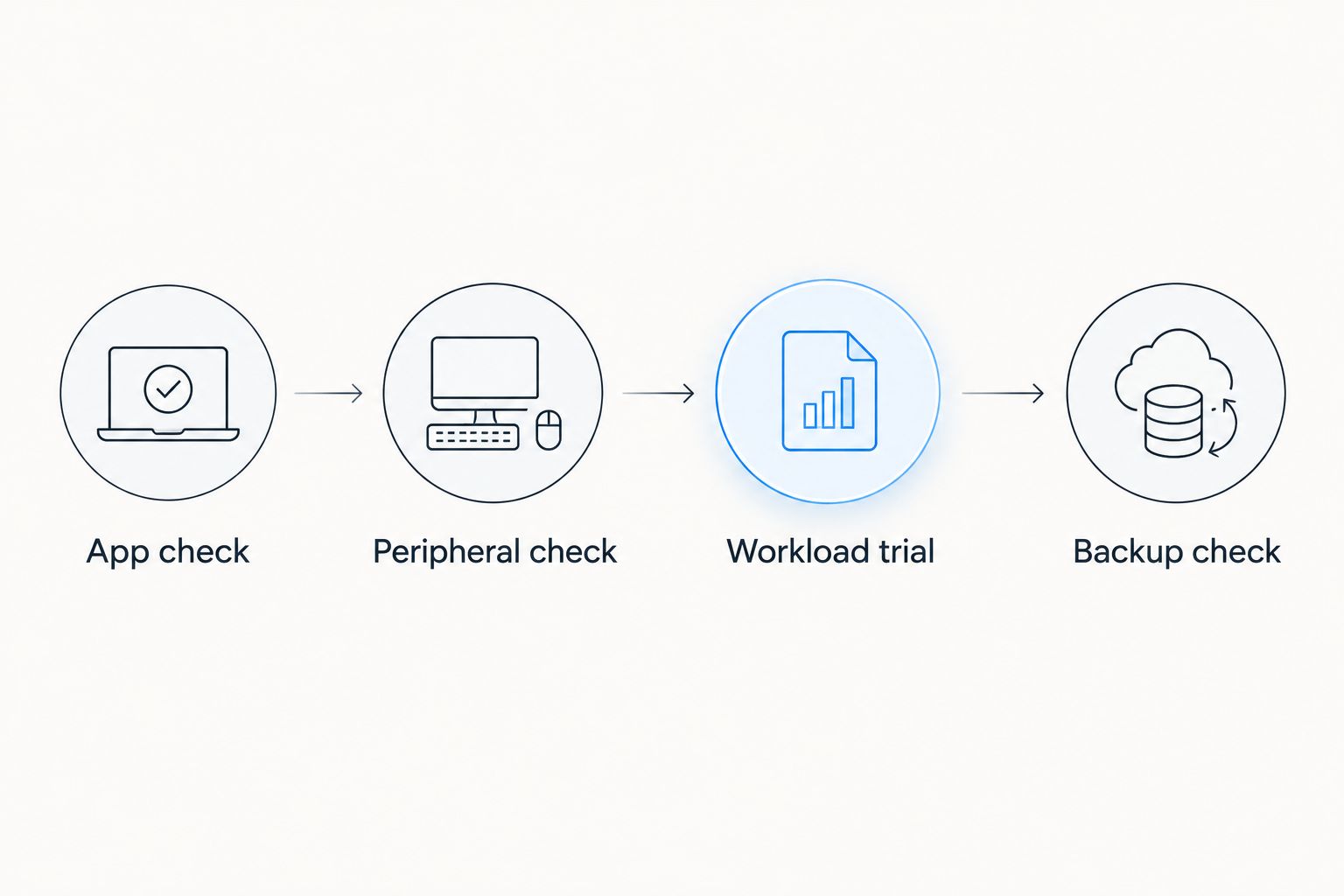
- App check: List the applications, add-ins, VPN, and security software you cannot work without.
- Peripheral check: Confirm support for your printer, scanner, dock, monitors, and specialist devices.
- Workload trial: Use representative documents, browser tools, and calls on the intended configuration where a trial is possible.
- Backup check: Confirm how business files will be protected and restored before moving them.
A workload trial should resemble your normal day rather than a demonstration video. Keep screen settings and connected accessories consistent when comparing devices, and record what work you completed alongside the battery reading.
A replacement laptop also needs a transition plan. Tabler's Computer Repair provides small-business IT support; decide who will handle setup, access, and maintenance before the old device leaves service.
Which business laptop should you choose?
Choose the Apple MacBook Pro 14-inch (M4) if your priority is the highest advertised video runtime in this shortlist and your software fits macOS. That is the default for a buyer focused on the headline battery ranking.
Choose the Microsoft Surface Laptop 15-inch for a larger Windows workspace, or the 13.8-inch Surface for compact Windows travel, after checking Arm compatibility. Choose the Apple MacBook Air 13-inch (M4) when everyday Mac portability matters more than topping the table.
For a 2026 business purchase, do not replace a compatible workflow merely to move higher in a battery ranking. A laptop that cannot run a required application fails the purchase test regardless of its stated endurance.
FAQ
What's the best business laptop ranked by battery life in this comparison?
The Apple MacBook Pro 14-inch with the base M4 chip leads this shortlist on manufacturer-rated video playback, at up to 24 hours. That is an advertised ceiling, not a shared office-work benchmark.
Will a laptop rated for 24 hours last through my whole workday?
A 24-hour video rating does not establish how long a laptop will last during your workday. Calls, applications, display settings, and connected accessories create a different workload.
Is the Surface Laptop 15-inch better than the 13.8-inch for battery life?
The Surface Laptop 15-inch has a higher advertised local video playback ceiling: up to 22 hours versus up to 20 hours for the 13.8-inch model. Choose screen size and compatibility alongside that figure.
Should I choose a MacBook Air or MacBook Pro for business travel?
Choose the MacBook Air 13-inch (M4) for a lighter Mac, or the MacBook Pro 14-inch (M4) for more built-in connections and a higher advertised video ceiling. Your required applications must support macOS.
Do business applications work on Snapdragon Windows laptops?
Compatibility depends on the application and its supporting components. Check the exact software, drivers, VPN, security tools, and peripherals before choosing a Snapdragon-based Surface Laptop.
How should I compare business laptop battery claims in 2026?
Compare the same workload category and exact laptop configuration first. Manufacturer video figures are useful shortlist information, but they are not interchangeable with measured office-work results.
Can Tabler's Computer Repair help with small-business IT support?
Tabler's Computer Repair provides remote and on-site computer repair, IT support, and recurring maintenance plans. The business serves homes and small businesses in North County San Diego and the Inland Empire.
One last thing
In 2026, compare the work completed—not just the battery percentage remaining. A device that spends the session failing to connect to a required peripheral has not passed a useful business test, even if its battery remains nearly full.
Before migrating, make file protection part of the purchase checklist. Battery endurance keeps a laptop running; backups address a different problem.