
Best overall: Lenovo ThinkPad T14 for Windows office work; best for mobile Mac users: Apple MacBook Air; best budget approach: a refurbished HP EliteBook. The best laptops for small business in 2026 depend on your applications, and Tabler's Computer Repair provides remote and on-site IT support for homes and small businesses in North County San Diego and the Inland Empire.
- Lenovo ThinkPad T14 is the default small-business laptop pick for Windows office work.
- Apple MacBook Air suits mobile businesses whose applications and peripherals support macOS.
- Dell Precision fits workstation workloads; Microsoft Surface Pro fits pen-led fieldwork.
- Choose refurbished HP EliteBook configurations carefully: condition and specifications determine value.
- Compare the best laptops for small business by software compatibility, memory, storage, and support needs.
Why this matters
A laptop that opens email is not necessarily a laptop that runs your business. Accounting software, specialist applications, printers, scanners, and remote-access tools all influence the right choice. Check those dependencies before comparing processors.
For your 2026 purchase, prioritize the work that stops when the computer fails. A mobile consultant needs a different machine from a designer working with large assemblies, even if both use the same browser and accounting service.
Tabler's Computer Repair provides small-business laptop support for homes and small businesses in its stated service area. Hardware selection and ongoing support are separate decisions: choose the machine for your applications, then decide how updates, backups, and repairs will be handled.
What makes the best small-business laptop?
Use these criteria to evaluate each recommendation before choosing a configuration:
- Application compatibility: Confirm the operating system, processor architecture, and hardware requirements of every essential application.
- Working memory: Use 16 GB RAM as a buying target for everyday office multitasking, not as a guarantee that every workload will fit.
- Storage headroom: Consider 512 GB SSD storage a planning target for local documents and applications. Large media libraries need a separate capacity assessment.
- Connections: List the displays, printers, scanners, network adapters, and other peripherals you must connect.
- Mobility and input: Decide whether a conventional keyboard, touch display, pen, or detachable design suits the actual job.
- Support and recovery: Check the exact model's repair options, operating-system support, backup process, and account-recovery arrangements.
These are purchasing recommendations, not specifications shared by every laptop below. Model names cover different generations and configurations; compare the exact unit you intend to buy.
Best business laptops at a glance
| Laptop or buying approach | Best for | Standout characteristic | Key limitation |
|---|---|---|---|
| Lenovo ThinkPad T14 | Everyday Windows office work | Conventional business-laptop format | Specifications and upgrade options differ by generation |
| Apple MacBook Air | Mobile Mac-based businesses | macOS in a portable laptop format | Windows-dependent workflows need compatibility checks |
| Dell Precision mobile workstation | CAD and workstation applications | Workstation-focused configurations | Unnecessary complexity for basic office work |
| Microsoft Surface Pro | Pen-led fieldwork and forms | Detachable tablet-and-keyboard design | Keyboard setup differs from a conventional laptop |
| Refurbished HP EliteBook | Budget-conscious office purchasing | Used business hardware | Battery condition and seller documentation require scrutiny |
No single configuration wins every category. The right 2026 purchase meets your software requirements without adding hardware that your work does not use.
1. Lenovo ThinkPad T14: best for Windows office work
The Lenovo ThinkPad T14 is a conventional business laptop suited to a Windows-centered office. It is the default recommendation here for document work, browser-based systems, spreadsheets, and routine administration when a specialist workstation or tablet is unnecessary.
Choose the exact configuration around your applications rather than buying on the ThinkPad name alone. Processor options, connections, memory arrangements, and displays vary between generations.
Lenovo ThinkPad T14 pros:
- A conventional keyboard-and-screen format suits desk work and travel without changing how you work.
- Windows configurations fit businesses whose required applications depend on Windows.
- The business-laptop format makes it a straightforward candidate for standardized office purchasing.
Lenovo ThinkPad T14 cons:
- The model name alone does not establish memory capacity, screen quality, or upgrade options.
- It is not the default choice for workloads that require a dedicated workstation-class graphics configuration.
Best for: Office owners and staff who need a Windows laptop for everyday business applications.
Before ordering, match the complete specification to your software requirements. If your accounting application needs a particular Windows edition or hardware feature, record that requirement in the purchase specification.
Verdict: Buy the Lenovo ThinkPad T14 for a standard Windows office role after checking the exact configuration.
2. Apple MacBook Air: best for mobile Mac-based businesses
The Apple MacBook Air suits a business that already works in macOS or has confirmed that its applications support macOS. It combines a conventional laptop layout with a portable design, making it a practical candidate for document work and browser-based administration away from a permanent desk.
The operating-system decision comes first. A familiar browser interface does not establish compatibility with specialist desktop software, printer utilities, or business add-ins.
Apple MacBook Air pros:
- It fits an existing Mac workflow without introducing a different desktop operating system.
- Its portable format suits businesses that move between work locations.
- A built-in keyboard and trackpad support conventional laptop work without a detachable setup.
Apple MacBook Air cons:
- Windows-only desktop applications are not native macOS applications.
- External-display support and connections depend on the exact model; verify your complete desk setup.
Best for: Mobile business owners whose required software and peripherals support macOS.
Do not buy the Apple MacBook Air on the assumption that a workaround will fix an essential application later. Ask the application vendor to confirm support for the exact Mac configuration and operating-system version.
Verdict: Buy the Apple MacBook Air for a confirmed Mac workflow; skip it when essential software requires Windows.
3. Dell Precision: best for CAD and workstation applications
Dell Precision mobile workstations are the specialist option in this list. Consider this product family when your design, engineering, or other professional application specifies hardware beyond an ordinary office laptop.
Start with the software vendor's hardware guidance. Where the vendor publishes certified configurations, match the exact workstation and graphics hardware rather than assuming that every Dell Precision qualifies.
Dell Precision pros:
- The workstation category gives specialist applications a more relevant starting point than general office laptops.
- Configurations can be evaluated against explicit processor, memory, and graphics requirements.
- A mobile workstation lets you keep a workstation-oriented workflow in a laptop format.
Dell Precision cons:
- Workstation specifications add little value when your work consists of email, documents, and ordinary browser applications.
- The product family is broad; the name does not prove that a particular unit meets your application's requirements.
Best for: Businesses buying around a named CAD, engineering, or workstation application.
Consider 32 GB RAM as a planning starting point for a workstation discussion, then follow the application's requirements and project size. That recommendation is not a specification for every Dell Precision configuration.
Verdict: Buy a Dell Precision only when its exact configuration meets a defined workstation requirement.
4. Microsoft Surface Pro: best for pen-led fieldwork
The Microsoft Surface Pro combines a tablet format with support for a detachable keyboard and pen input. Its strongest use case here is work where you alternate between typing and handling forms, annotations, or documents directly on the display.
This is a workflow choice, not an automatic upgrade over a conventional laptop. Test how the device rests on the surfaces you actually use during visits or inspections.
Microsoft Surface Pro pros:
- The detachable design supports a tablet-style workflow when a keyboard gets in the way.
- Pen input suits annotation and handwriting tasks in compatible applications.
- A keyboard-equipped setup supports document editing alongside touch-led work.
Microsoft Surface Pro cons:
- A kickstand-and-keyboard arrangement feels different from a conventional laptop on your lap.
- Processor architecture, application compatibility, and accessory compatibility require exact-model checks.
Best for: Field-based staff who genuinely use touch or pen input as part of their work.
Include the intended keyboard and pen in your purchasing specification. Do not assume that an accessory is included or that an older accessory fits a different generation.
Verdict: Buy the Microsoft Surface Pro for a defined tablet-and-pen workflow; skip it for typing-only work.
5. Refurbished HP EliteBook: best for budget-conscious purchasing
A refurbished HP EliteBook is a purchasing approach rather than one fixed specification. Evaluate the individual machine's generation, condition, battery, operating-system eligibility, and seller documentation before treating it as a business-ready option.
This route suits ordinary office work when the exact unit meets your requirements. An older business laptop is not automatically a better purchase than a newer general-purpose machine.
Refurbished HP EliteBook pros:
- You can select an existing business-laptop configuration around a defined office workload.
- A documented refurbishment gives you specific condition and configuration details to evaluate.
- Reusing a suitable machine avoids replacing hardware solely because it is not new.
Refurbished HP EliteBook cons:
- Battery wear and physical condition differ between individual units.
- Older hardware needs explicit checks for supported operating systems, firmware, and required applications.
Best for: Buyers who prioritize purchasing value and can assess the exact machine rather than the model family.
Reject vague listings that omit the processor model, installed memory, storage capacity, or condition information. Confirm that organizational management locks and previous-owner accounts have been removed.
Verdict: Buy a refurbished HP EliteBook only with clear specifications, condition documentation, and a workable return policy.
How the laptops are ranked
This 2026 ranking separates buying roles rather than claiming an overall performance benchmark. Application compatibility comes first, followed by working memory, storage, connections, input method, and support needs.
The Lenovo ThinkPad T14 leads because it fits the conventional Windows office role. The other recommendations solve different problems: Mac-based mobility, workstation applications, pen-led fieldwork, or carefully assessed refurbished purchasing.
No recommendation substitutes for checking the exact configuration. A family name is not a hardware specification.
Check the complete setup before you buy
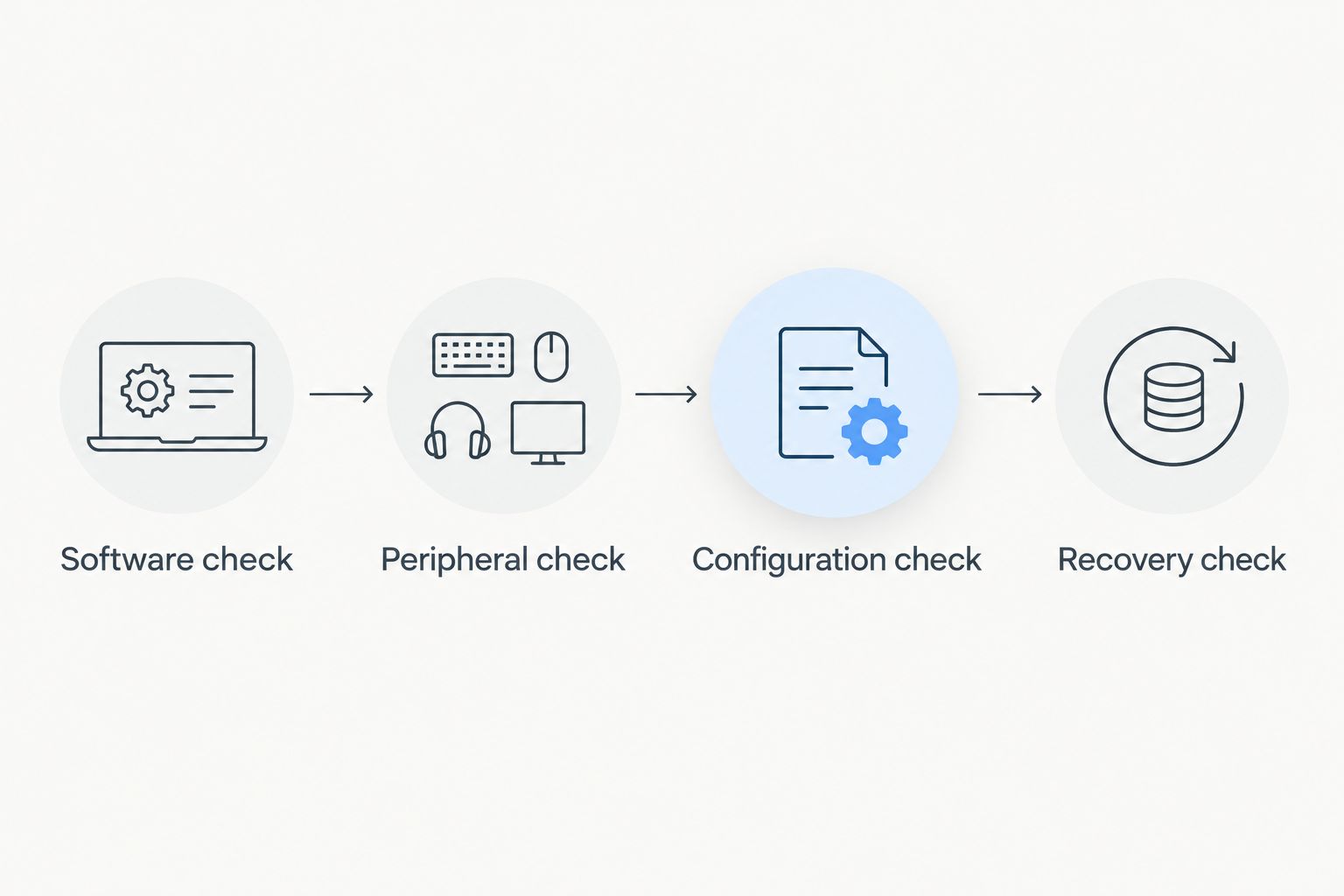
Use this sequence to turn a shortlist into a purchasing decision:
- Software check: List essential applications and confirm supported operating systems and processor architectures.
- Peripheral check: Confirm your printers, scanners, displays, docks, and specialist USB devices work with the selected configuration.
- Configuration check: Record the required memory, storage, connections, and input accessories.
- Recovery check: Decide how files, application settings, and account access will be restored after a failure.
Each check answers a separate question. A compatible application does not prove that its connected scanner will work, and copied documents do not prove that the complete business workflow can be restored.
Tabler's Computer Repair provides small-business laptop support through remote and on-site services, alongside recurring maintenance plans. Separate the purchase decision from the support plan so both have a clear purpose.
Which laptop should you choose?
Choose the Lenovo ThinkPad T14 if you need a conventional Windows office laptop and have no specialist requirement. Choose the Apple MacBook Air for a confirmed Mac workflow, the Dell Precision for specified workstation needs, or the Microsoft Surface Pro when pen input changes how you work.
Treat a refurbished HP EliteBook as a condition-dependent alternative, not a blanket recommendation. For a 2026 purchase, written specifications and compatibility checks matter more than the badge on the lid.
FAQ
What's the best laptop for a small business in 2026?
The Lenovo ThinkPad T14 is the default recommendation here for a conventional Windows office. Choose a different category when essential software requires macOS, workstation hardware, or a tablet-and-pen workflow.
Is a MacBook Air good for a small business?
The Apple MacBook Air is a suitable choice when your essential applications and peripherals support macOS. Confirm specialist desktop software, business add-ins, printers, and external displays before purchasing.
How much RAM should a small-business laptop have?
Use 16 GB RAM as a purchasing target for everyday office multitasking. Specialist applications and larger projects need a separate assessment based on the software vendor's requirements.
Is 512 GB storage enough for business work?
A 512 GB SSD is a useful planning target for office documents and applications, not a guarantee of sufficient capacity. Measure your current files and account for local email, synchronized folders, and project growth.
Should a small business buy a refurbished laptop?
A refurbished laptop is worth considering when the exact unit meets your requirements and has documented condition information. Check battery condition, operating-system support, management locks, and the seller's return policy.
Do I need a workstation laptop for spreadsheets and email?
Email and ordinary spreadsheet work do not by themselves justify a workstation laptop. Select workstation hardware when your actual applications or project sizes require it.
Can Tabler's Computer Repair help with business computer support?
Tabler's Computer Repair provides remote and on-site computer repair, IT support, and recurring maintenance plans. Its stated service area covers homes and small businesses in North County San Diego and the Inland Empire.
One last thing
A successful file transfer is not a recovery test. Before retiring your old laptop in 2026, open essential files, launch required applications, confirm access to business accounts, and restore a sample file from your backup. Keep the old machine secure until those checks are complete.