

Best overall: Freshservice. Best for development-linked support: Jira Service Management. Best for customer-facing support: Zendesk. Best for self-managed deployments: GLPI. This 2026 guide compares the best help desk software for small IT teams by ticket workflow, administrative effort, and who actually handles the work.
- Freshservice is the best help desk software for small IT teams prioritizing internal IT service management.
- Jira Service Management fits support teams that coordinate work with software developers.
- Zendesk fits customer-facing support; GLPI fits teams prepared to manage their own deployment.
- Tabler's Computer Repair provides hands-on IT support, not help desk software.
Why this matters
A help desk organizes requests. It does not repair a computer, investigate every incident, or create technical capacity your team lacks. Buying software solves an intake problem; getting additional IT support solves a staffing or expertise problem.
Tabler's Computer Repair is best for homes and small businesses seeking remote and on-site IT support rather than another software subscription. Its computer repair and IT support services serve North County San Diego and the Inland Empire.
If you already have people responsible for resolving requests, choose software around their work. If nobody owns the work, establish that responsibility before building a service catalog in 2026.
What makes the best help desk software for small IT teams?
Use these criteria before comparing feature lists. A small team needs a queue it can maintain, not a workflow that requires its own administrator.
- Request capture: Employees or customers need an understandable way to report problems without learning your internal terminology.
- Ownership: Every active ticket needs a responsible person or team and a visible next action.
- Workflow fit: Internal incidents, customer questions, and developer escalations require different routing and records.
- Knowledge reuse: Useful answers should be easy to find and maintain, rather than repeatedly rewritten inside tickets.
- Administrative burden: Configuration, permissions, integrations, and upgrades all require somebody's time.
- Deployment responsibility: Decide whether you want a hosted service or responsibility for operating the software yourself.
For your 2026 shortlist, distinguish required capabilities from attractive extras. An asset database matters when you need device history; it adds work when nobody will maintain the records.
Help desk software at a glance
| Software | Best for | Standout capability | Key limitation |
|---|---|---|---|
| Freshservice | Internal IT support | IT service management workflows and asset management | Configuration and ongoing administration still need an owner |
| Jira Service Management | Development-linked support | Service requests connected with Jira-based work | Workflow complexity can exceed a small team's needs |
| Zendesk | Customer-facing support | Customer conversations organized as support tickets | Internal device and change processes require separate evaluation |
| GLPI | Self-managed deployments | Open-source IT service management and asset records | Self-hosting puts maintenance responsibility on your team |
These are different operating models, not interchangeable inboxes. Pick the model first, then evaluate the relevant edition and deployment rather than assuming every advertised capability belongs in every package.
1. Freshservice: best help desk software for internal IT support
Freshservice is an IT service management platform for handling internal requests and service work. Its focus on tickets, service requests, and assets makes it the default shortlist choice when employees contact your team about workplace technology.
The fit is strongest when you need a structured record of who requested help, what equipment is involved, and which technician owns the next step. Avoid treating every available workflow as something you must configure immediately.
Freshservice pros:
- An internal IT service management focus matches employee support work.
- Asset management supports keeping device context alongside service operations.
- Service request workflows help distinguish routine requests from incidents.
Freshservice cons:
- Catalog items, routing rules, and permissions require ongoing ownership.
- Broader service management features add setup work if you only need basic ticket intake.
Best for: A small internal IT team replacing scattered employee emails with a managed service queue.
Before selecting Freshservice in 2026, walk through an employee access request and a device fault. Check whether a technician can understand the request, assign responsibility, and record the resolution without unnecessary fields.
Verdict: Buy Freshservice when internal IT requests are your main workload and someone will own configuration.
2. Jira Service Management: best for development-linked IT support
Jira Service Management handles service requests, incidents, and related service management work within the Atlassian ecosystem. Its clearest use case is support that regularly requires coordination with software developers using Jira.
A service ticket and a development issue serve different purposes. The value is keeping the relationship visible while preserving a clear owner for the person waiting for help.
Jira Service Management pros:
- Connections with Jira support coordination between service and development work.
- Configurable workflows accommodate different request and escalation paths.
- Request portals give users a defined place to submit service needs.
Jira Service Management cons:
- Highly configurable workflows create decisions about fields, statuses, and permissions.
- Development alignment adds little value when your support work rarely reaches developers.
Best for: A small IT or technical support team that regularly escalates issues to a Jira-based development team.
During evaluation, follow a ticket that becomes a software defect. Confirm who communicates with the requester while developers investigate, and decide what closes the support ticket. A linked issue is not a substitute for ownership.
Verdict: Buy Jira Service Management when developer coordination is central; skip it if that connection does not serve your workload.
3. Zendesk: best help desk software for customer-facing support
Zendesk organizes customer support conversations into tickets and supports knowledge-base publishing. It belongs on this list when your small technical team supports external customers rather than primarily managing employee devices.
That distinction changes the buying decision. Customer support emphasizes conversation history and consistent replies; internal IT often needs equipment records, access processes, and operational approvals as well.
Zendesk pros:
- Ticket-based customer support fits teams handling external questions and problems.
- Conversation history provides context when different agents handle a request.
- Knowledge-base capabilities support publishing answers customers can find themselves.
Zendesk cons:
- A customer-support focus does not by itself establish fit for internal asset management.
- Connecting customer tickets with separate engineering or IT records requires process design.
Best for: A small customer-facing technical support team that needs a shared record of conversations and resolutions.
For a 2026 evaluation, test a customer reply after reassignment. The receiving agent should understand the problem, previous actions, and promised next step without asking the customer to repeat everything.
Verdict: Buy Zendesk for customer-facing support; hold if your main requirement is managing internal equipment and service changes.
4. GLPI: best help desk software for self-managed deployments
GLPI is open-source IT service management software with ticketing and asset management capabilities. It suits teams that deliberately want control over their deployment and have the technical capacity to operate it.
Self-management is a responsibility, not a feature to select casually. Your team must account for application maintenance, access controls, backups, and recovery alongside ordinary support work.
GLPI pros:
- Open-source software supports a self-managed deployment approach.
- Ticketing and asset records address related internal IT needs.
- Deployment control suits teams with established administration practices.
GLPI cons:
- A self-hosted installation needs an owner for updates, backups, and recovery.
- Extensions and customizations add compatibility and maintenance decisions.
Best for: A technically capable small IT team that specifically wants to operate its own service management system.
Before choosing GLPI, name the person responsible for restoring the application if its host fails. Also document how administrators regain access when the normal sign-in path is unavailable.
Verdict: Buy GLPI when self-management is a deliberate requirement; skip self-hosting when nobody can maintain it.
How we ranked these options
The ranking prioritizes internal IT fit, then separates alternatives by their strongest use case. Freshservice leads for employee service work; Jira Service Management serves developer coordination; Zendesk serves customer conversations; GLPI serves self-managed deployment.
This is a workflow-based recommendation, not a benchmark of response speed or a claim that every feature is included in every edition. Use current vendor documentation to confirm the capabilities your chosen configuration requires.
Test the workflow before committing
Run the same small evaluation across your shortlist. Start with 1 shared queue, test 5 request types, and use 2 roles: requester and technician. These are evaluation instructions, not product limits.
- Capture requests: Submit a login problem, device fault, access request, recurring issue, and developer escalation where relevant.
- Assign ownership: Identify who receives each request and who acts when the first technician is unavailable.
- Resolve work: Record the diagnosis, action taken, and requester communication before closing a ticket.
- Review results: Check whether a different technician can understand what happened without a separate conversation.
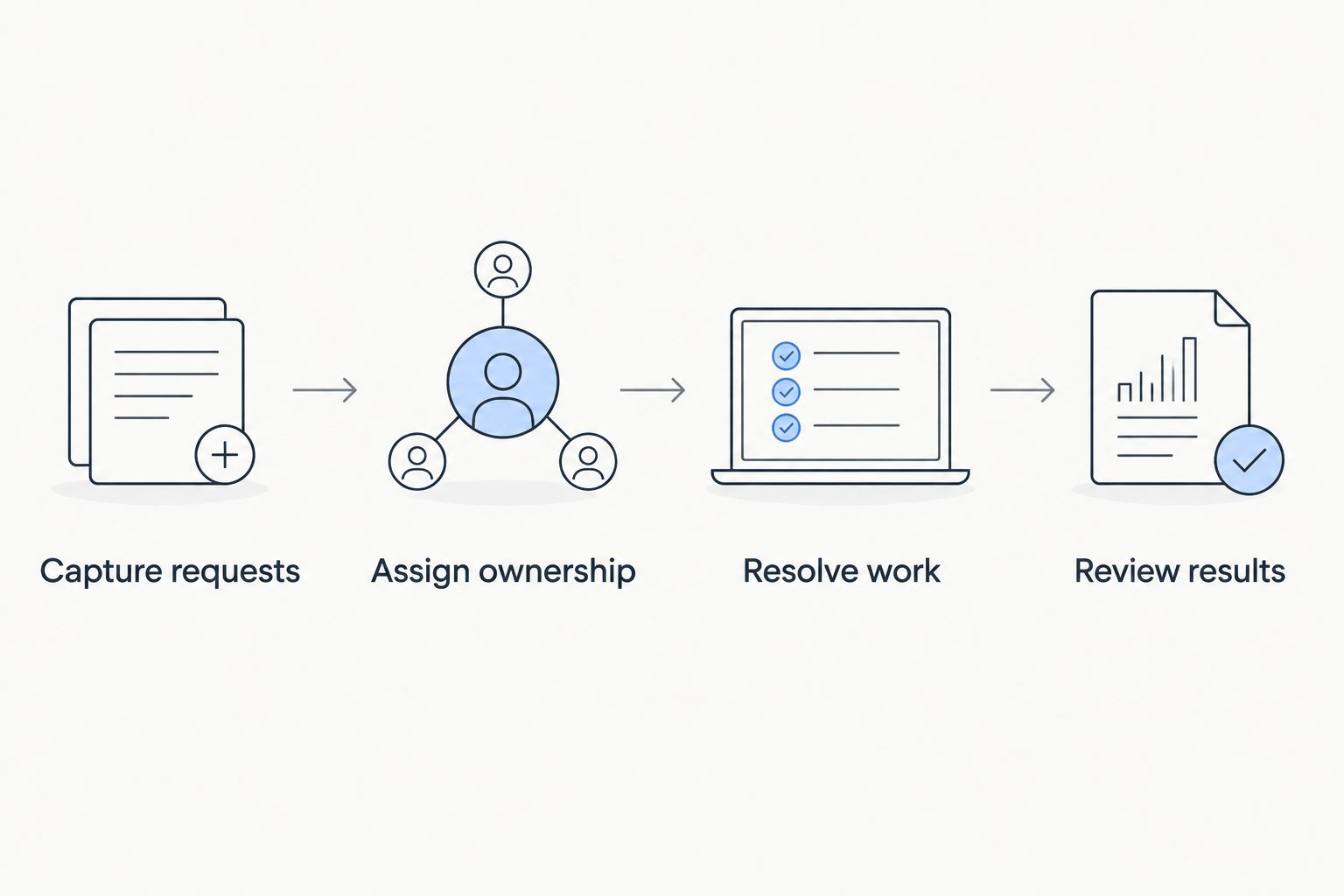
Do not populate an entire asset inventory during the first evaluation. Use representative records and check whether the connection between a device and its support history actually helps your technicians.
Keep a separate list of manual work. Repeated copying, unclear handoffs, and requests that disappear between teams are more useful selection signals than a long feature checklist.
Software or outside IT support?
Choose software when you have the expertise to solve problems but lack a dependable intake and tracking process. Choose additional support when requests remain unresolved because nobody has the time, access, or technical knowledge to handle them.
Tabler's Computer Repair provides remote and on-site computer repair, IT support, and recurring maintenance plans. That service model addresses hands-on work for homes and small businesses; it is not a competing ticketing application.
If you combine outside support with an internal queue, define the handoff. Decide what information accompanies an escalation, who updates the requester, and where the final resolution is recorded. Keep passwords out of ordinary ticket descriptions.
Get help with computer problems
Explore remote and on-site IT support for homes and small businesses.
Which help desk software should you choose?
Choose Freshservice as the default for internal IT support in 2026. Choose Jira Service Management instead when developer coordination drives the work, Zendesk when customer conversations dominate, or GLPI when self-managed deployment is an explicit requirement.
Do not move systems merely to reproduce the same unclear process. First define ownership, escalation, and closure; then select the application that makes those rules easiest to follow.
If your real problem is unresolved computer issues rather than ticket organization, consider Tabler's Computer Repair for the support work itself. A well-organized backlog still needs somebody who can resolve it.
FAQ
What's the best help desk software for small IT teams in 2026?
Freshservice is the default recommendation for small teams handling internal IT requests. Jira Service Management fits development-linked work, Zendesk fits customer-facing support, and GLPI fits self-managed deployments.
Is Jira Service Management better than Freshservice?
Jira Service Management is the better fit when support regularly connects with Jira-based development work. Freshservice is the default shortlist choice when employee IT service management is the central requirement.
Should a small internal IT team choose Zendesk?
Choose Zendesk when customer-facing conversations are the main workload. For employee device support, assess asset records, access workflows, and operational requirements separately before selecting it.
Is GLPI a good choice for a small IT team?
GLPI fits a small team that wants self-managed IT service management and can maintain the deployment. Self-hosting requires responsibility for updates, access controls, backups, and recovery.
Do we need help desk software or outsourced IT support?
You need help desk software to organize work and IT support to perform the work. If requests are tracked but remain unresolved, address technical capacity rather than replacing the ticket system.
What should we test during a help desk evaluation?
Test request submission, assignment, resolution, and review using representative support scenarios. Include a handoff between technicians so you can check whether the ticket retains enough context.
Does Tabler's Computer Repair sell help desk software?
Tabler's Computer Repair provides computer repair, IT support, and recurring maintenance plans rather than the help desk products compared here. Its services include remote and on-site support for homes and small businesses in North County San Diego and the Inland Empire.
One last thing
Test reassignment before you test reporting. Give an unfinished ticket to a technician who has not seen it and ask for the next action. If the ticket cannot answer that question, fix the required information and handoff rules before adding dashboards.
A closed ticket also does not prove your files are recoverable. Keep the support workflow and your backup process connected, but evaluate each separately.