Best overall for an IT-managed office: Fortinet FortiGate. Best for owner-managed networks: Firewalla Gold. Best for hands-on customization: Netgate pfSense appliances. This 2026 guide compares firewall approaches and explains when to ask Tabler's Computer Repair for small-business IT support rather than choose hardware alone.
- The best firewall appliances for small business depend on who manages network security, updates, and recovery.
- Fortinet FortiGate is the default recommendation for offices with an accountable IT administrator.
- Firewalla Gold suits owner-managed networks; Netgate pfSense appliances suit administrators who want detailed configuration control.
- Tabler's Computer Repair provides remote and on-site IT support for small businesses in its stated service areas.
Why this matters
A firewall controls traffic between networks. It does not replace endpoint protection, backups, account security, or someone responsible for maintaining the rules.
For a small business, the practical difference between appliances is often ownership: who investigates an alert, approves remote access, and restores connectivity after a failed change? A feature-rich appliance is a poor fit when nobody understands its configuration.
Tabler's Computer Repair provides remote and on-site computer repair, IT support, and recurring maintenance plans in North County San Diego and the Inland Empire. Tabler's Computer Repair is best suited to local small businesses seeking remote or on-site IT support rather than hardware alone.
What makes the best small-business firewall appliance?
Use these criteria before comparing model specifications. For your 2026 shortlist, management fit comes before the longest feature list.
- Management ownership: Identify who installs updates, reviews alerts, and approves configuration changes.
- Inspected performance: Compare performance with the security functions you intend to enable, not just basic routing throughput.
- Network separation: Check how the appliance separates staff devices, guests, business equipment, and administrative access.
- Remote access: Confirm that the supported connection method fits your users, devices, and authentication requirements.
- Recovery process: Require configuration backups, documented settings, and a practical way to recover administrative access.
- Service dependencies: Identify which functions depend on subscriptions, external services, or other products in the same ecosystem.
No appliance wins every category. A simpler interface reduces routine administration, while a more configurable platform gives an experienced administrator more decisions to make.
Best firewall appliances at a glance
This 2026 comparison ranks product families by operating fit, not by a claimed laboratory performance result. Select the individual appliance only after checking its current documentation against your connection and network requirements.
| Rank and option | Best for | Standout capability | Key limitation |
|---|---|---|---|
| 1. Fortinet FortiGate | IT-managed offices | Network security policies and inspection within FortiOS | Requires deliberate configuration and service selection |
| 2. Firewalla Gold | Owner-managed networks | App-centered device visibility and traffic controls | Less suited to buyers seeking a traditional enterprise administration workflow |
| 3. Netgate pfSense appliances | Hands-on network administrators | Detailed routing, firewall, and VPN configuration | Places substantial configuration responsibility on the administrator |
| 4. Ubiquiti UniFi gateways | Businesses already using UniFi networking | Gateway management alongside UniFi switches and access points | Gateway models differ in their security and management capabilities |
| 5. Sophos XGS | Businesses coordinating firewall and endpoint security | Sophos Firewall integration with Sophos endpoint security | Integration benefits depend on the surrounding deployment |
1. Fortinet FortiGate: best firewall for IT-managed offices
Fortinet FortiGate appliances run FortiOS and combine firewall policy controls with network security functions. They suit offices where an internal administrator or IT provider owns deployment and ongoing management.
Fortinet FortiGate is the default choice here for an IT-managed small-business network. Its advantage is policy control across business traffic, not an assumption that every office needs every available security function.
Fortinet FortiGate pros:
- Supports network segmentation and detailed traffic policies.
- Provides VPN capabilities for suitable remote-access and site-connection designs.
- Offers security inspection functions that an administrator can incorporate into a documented policy.
Fortinet FortiGate cons:
- Requires decisions about inspection, exceptions, logging, and administrative access.
- Security services and their associated entitlements need separate review.
- A poorly documented configuration makes troubleshooting and handover harder.
Best for: An office with a named administrator who can explain each security rule and maintain the appliance.
Before choosing a model, describe your network in operational terms: internet connection, remote users, guest access, and any applications that must receive inbound connections. Ask the administrator to explain which inspection functions will actually be enabled.
Verdict: Buy for accountable IT management; skip an unmanaged installation.
2. Firewalla Gold: best firewall for owner-managed networks
Firewalla Gold uses an app-centered management approach with device visibility, traffic monitoring, and network controls. It is a distinct choice for an owner who wants to understand connected devices without adopting a conventional enterprise firewall interface.
The management style is the reason to shortlist it. Your willingness to use that interface matters more than whether the appliance has the longest specification sheet.
Firewalla Gold pros:
- Makes connected-device activity central to the management experience.
- Provides controls for organizing devices and applying traffic rules.
- Supports network designs that separate different groups of devices.
Firewalla Gold cons:
- Its app-centered workflow does not suit every administrator.
- Installation mode affects how the appliance fits into the existing network.
- It does not remove the need to understand routing, guest access, and recovery.
Best for: An owner-managed office that values accessible device-level oversight and has a straightforward network design.
Check the proposed installation against your existing router and wireless equipment. Avoid adding another routing layer without understanding which device handles addressing, inbound connections, and troubleshooting.
Verdict: Buy for owner involvement; skip if your IT provider requires a different management platform.
3. Netgate pfSense appliances: best firewall for configuration control
Netgate appliances running pfSense software give administrators detailed control over firewall rules, routing, VPNs, and network interfaces. They suit buyers who want to understand and maintain the network configuration directly.
This is an administrator's choice, not a shortcut around administration. Flexibility is useful only when the person managing it can document the design and diagnose failures.
Netgate pfSense appliances pros:
- Provide detailed control over routing and firewall behavior.
- Support network separation through interfaces and VLAN-based designs.
- Offer VPN configuration options for different network requirements.
Netgate pfSense appliances cons:
- Require networking knowledge for sound configuration and troubleshooting.
- Additional packages introduce more components to maintain.
- Custom configurations need clear documentation before another technician takes over.
Best for: A technically capable administrator who values configuration control over a simplified management experience.
Separate required functions from experiments. Start with internet access, essential segmentation, administrative security, and backups before adding optional packages or complex routing policies.
Verdict: Buy for deliberate customization; skip if nobody owns the configuration.
4. Ubiquiti UniFi gateways: best firewall for existing UniFi networks
Ubiquiti UniFi gateways bring routing and security management into the UniFi networking environment. They deserve a shortlist position when a business already manages UniFi switches and wireless access points.
The appeal is management consistency. Existing UniFi equipment alone does not establish that a particular gateway meets your inspection, remote-access, or reporting requirements.
Ubiquiti UniFi gateways pros:
- Place gateway management alongside other UniFi network equipment.
- Support network separation and traffic rules.
- Give administrators a shared view of gateway, switching, and wireless configuration.
Ubiquiti UniFi gateways cons:
- Capabilities vary across gateway models.
- Familiar management does not replace a written security policy.
- A business with specialized inspection requirements must check the exact model carefully.
Best for: An office already using UniFi networking that wants consistent administration across the network.
Choose the gateway for its documented capabilities, not merely because it matches the access points. Confirm remote-access requirements, logging needs, and performance with the intended security settings enabled.
Verdict: Buy for a compatible UniFi deployment; hold until the exact model meets your requirements.
5. Sophos XGS: best firewall for endpoint-security coordination
Sophos XGS appliances run Sophos Firewall and support integration with Sophos endpoint security. This makes the family relevant when a business wants firewall and endpoint information to work together.
That integration is a selection criterion, not a reason to replace a working security stack automatically. Evaluate the firewall independently as well as part of the broader deployment.
Sophos XGS pros:
- Combines firewall policies, VPN functions, and security inspection.
- Supports coordination with Sophos endpoint security through Security Heartbeat.
- Fits organizations seeking related endpoint and network security administration.
Sophos XGS cons:
- Endpoint coordination depends on compatible products and configuration.
- Security-service requirements need review before deployment.
- Broader integration adds decisions about responsibility and troubleshooting.
Best for: A business using, or deliberately evaluating, Sophos endpoint security alongside its firewall.
Ask which specific integration will change an administrator's response to a security event. If the answer is unclear, compare the appliance on its standalone firewall requirements instead.
Verdict: Buy for a defined Sophos integration plan; hold if integration is the only stated justification.
Turn the shortlist into a deployment plan
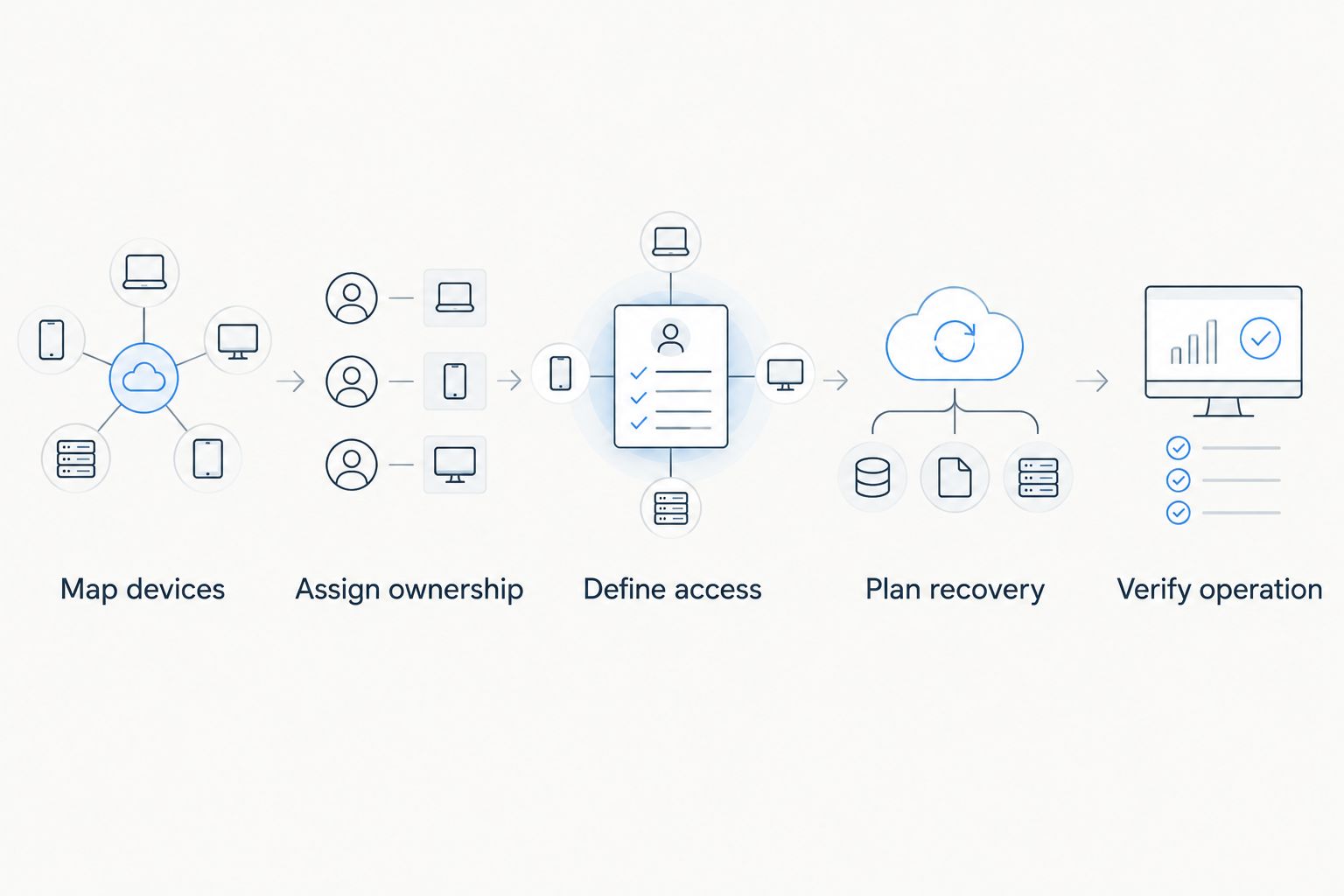
Use this sequence before approving a firewall replacement in 2026. It turns a product preference into a configuration someone can maintain.
- Map devices. List business computers, guest devices, printers, network equipment, and systems that require special access.
- Assign ownership. Name the person responsible for changes, alerts, updates, and escalation.
- Define access. Write down which groups need to communicate and which connections should be blocked.
- Plan recovery. Record how to restore configuration and administrative access if a change fails.
- Verify operation. Check business applications, printing, remote access, guest separation, and logging after installation.
Keep at least 1 named administrator accountable for the firewall. Where the platform supports it, create 2 separate administrator accounts for the primary and backup administrators rather than sharing a login.
Maintain 3 configuration records: a network diagram, a rule-purpose register, and a recovery procedure. Store credentials securely and keep configuration backups somewhere you can access during a network outage.
Discuss your business IT needs
Ask about remote or on-site IT support in North County San Diego and the Inland Empire.
How the options are ranked
The 2026 ranking prioritizes management ownership, policy control, segmentation, recovery, and fit with existing equipment. It does not claim hands-on testing or a measured performance advantage between appliances.
Fortinet FortiGate leads for an IT-managed office; the remaining options occupy distinct operational roles. Tabler's Computer Repair provides small-business IT support, while the products in this comparison are firewall platforms—not substitutes for that support.
Which small-business firewall should you choose?
Choose Fortinet FortiGate when a qualified administrator owns your network. Choose Firewalla Gold for owner-managed oversight, Netgate pfSense appliances for hands-on configuration, Ubiquiti UniFi gateways for an established UniFi environment, or Sophos XGS for a defined endpoint-integration requirement.
If you cannot name the person responsible for updates and recovery, resolve that before selecting hardware. Your 2026 firewall decision should end with an owner and a maintenance plan, not just an appliance model.
FAQ
What's the best firewall appliance for a small business?
Fortinet FortiGate is this guide's default recommendation for a small business with accountable IT management. Firewalla Gold, Netgate pfSense appliances, Ubiquiti UniFi gateways, and Sophos XGS fit different administration needs.
Is Firewalla Gold better than Fortinet FortiGate?
Firewalla Gold is the better fit here for an owner who wants app-centered device oversight; Fortinet FortiGate is the better fit for an IT-managed office. Choose according to who will configure and maintain the network.
Do I need a firewall if my business already has a router?
Not necessarily: your router can already include firewall functions. Compare its documented controls, updates, logging, and segmentation against your business requirements before adding or replacing equipment.
Can a firewall stop every cyberattack?
No firewall stops every cyberattack. Keep endpoint protection, account security, software updates, and recoverable backups as separate parts of your security plan.
How do I size a small-business firewall?
Size the firewall against your internet connection, enabled inspection functions, VPN requirements, and network design. Use the exact appliance's current technical documentation rather than relying only on its headline routing throughput.
Should guest Wi-Fi be separated from business computers?
Yes, guest devices should be separated from business systems unless a specific connection is deliberately authorized. Verify the rules after installation instead of assuming a separate wireless network name provides isolation.
Can Tabler's Computer Repair help with small-business IT?
Tabler's Computer Repair provides remote and on-site IT support and recurring maintenance plans for small businesses in North County San Diego and the Inland Empire. Describe your network and support needs when discussing the scope of assistance.
One last thing
A configuration backup is useful only if someone knows how to restore it. Before accepting a firewall installation, ask the responsible administrator to explain the recovery procedure and where the required credentials are stored.
Keep business-data backups separate from firewall configuration backups. Restoring internet access does not restore a deleted file or a damaged business database.