
Best overall for Microsoft-centered offices: Microsoft Defender for Business. Best for mixed Windows and Mac fleets: Bitdefender GravityZone Business Security. Best for businesses that need an on-premises management option: ESET PROTECT Entry. This 2026 guide compares the best antivirus software for small business by management needs, device coverage, and responsibility for security alerts.
- Microsoft Defender for Business is the default antivirus choice for Microsoft-centered small businesses.
- Bitdefender GravityZone Business Security suits mixed Windows and Mac fleets that need centralized endpoint protection.
- ESET PROTECT Entry suits businesses that want a choice between cloud and on-premises security management.
- Tabler's Computer Repair provides small-business IT support; choose antivirus software with a clear owner for alerts.
Why this matters
Business antivirus is not just a scanner on each computer. It also needs to tell you which devices are protected, which need attention, and who must respond when something suspicious happens.
The best antivirus is the one your business can manage consistently. A security console nobody checks leaves an operational gap, regardless of the product's feature list. Tabler's Computer Repair provides remote and on-site IT support and recurring maintenance plans for homes and small businesses in North County San Diego and the Inland Empire.
For your 2026 decision, start with the person responsible for security rather than the longest feature checklist. A business owner managing a few laptops has different needs from an IT administrator overseeing computers, servers, and separate employee accounts.
What makes the best antivirus software for small business?
Use these criteria before comparing product names. They separate a suitable business endpoint product from software that merely installs successfully.
- Central management: You need a shared view of protected computers, policy settings, and unresolved alerts. Managing each machine separately makes consistency harder.
- Device fit: Confirm support for your operating systems and versions. Check server requirements separately from employee laptops and desktops.
- Response capability: Detection should lead to an action, such as investigating an alert or isolating an affected device. Establish who has authority to act.
- Administrative fit: Choose a console your internal administrator or outside support provider can maintain. More controls create more decisions, not automatically better security.
- Recovery planning: Antivirus belongs alongside backups, software updates, and account protection. It does not replace any of them.
- Deployment requirements: Check existing security software, remote access arrangements, and business-critical applications before changing endpoint protection.
Small-business antivirus at a glance
These are use-case recommendations, not a claim that one product catches every threat better than another. Each option has a distinct reason to make your shortlist.
| Antivirus software | Best for | Standout capability | Key limitation |
|---|---|---|---|
| Microsoft Defender for Business | Microsoft-centered small businesses | Endpoint detection and response with automated investigation and remediation | Designed for businesses with up to 300 users; configuration and alert ownership still matter |
| Bitdefender GravityZone Business Security | Mixed Windows and Mac fleets | Centralized endpoint protection through GravityZone Control Center | Requires separate security administration alongside your other business systems |
| ESET PROTECT Entry | Businesses requiring an on-premises management option | Choice of cloud or on-premises management for endpoint protection | An on-premises console adds infrastructure and maintenance responsibilities |
Do not choose from this table alone. Read the limitations against your actual environment, especially if you have older computers, specialist applications, or a server that cannot tolerate an unplanned interruption.
1. Microsoft Defender for Business: best for Microsoft-centered offices
Microsoft Defender for Business combines business endpoint protection with endpoint detection and response, automated investigation, and remediation capabilities. It is designed for small and medium-sized businesses with up to 300 users.
It is also included in Microsoft 365 Business Premium. That makes it a sensible first product to assess when your business already uses that subscription, rather than assuming you need an unrelated antivirus package.
Microsoft Defender for Business is the best default antivirus choice for small businesses already centered on Microsoft 365. The reason is operational fit, not a claim of universal detection superiority.
Microsoft Defender for Business pros
- Central management lets an administrator review endpoint security beyond an individual computer.
- Endpoint detection and response adds investigation capabilities beyond basic malware scanning.
- Automated investigation and remediation help address supported threats without making every response entirely manual.
- Inclusion in Microsoft 365 Business Premium makes an existing subscription worth checking before selecting another product.
Microsoft Defender for Business cons
- The product is designed for organizations with up to 300 users, so larger businesses need a different licensing and product assessment.
- You still need someone to configure policies, review alerts, and handle issues that require judgment.
- The Microsoft Defender name covers different products; built-in Windows antivirus is not the same as the complete business service.
When Microsoft Defender for Business fits
Choose Microsoft Defender for Business when your computers, user administration, and existing support arrangements already center on Microsoft. Confirm the actual subscription assigned to each user and the devices enrolled in management.
For a 2026 rollout, verify coverage in the management console rather than relying on a Windows security icon. A computer having local antivirus enabled does not prove it is enrolled in your business security service.
Best for: Microsoft-centered small businesses with a named security administrator or support provider.
Verdict: Buy Microsoft Defender for Business for its Microsoft fit, after confirming enrollment and alert ownership.
2. Bitdefender GravityZone Business Security: best for mixed fleets
Bitdefender GravityZone Business Security provides centrally managed endpoint protection through GravityZone Control Center. It is a suitable shortlist option when your business needs to manage Windows and Mac endpoint protection together.
Its distinct role here is a dedicated endpoint-security platform rather than a decision driven by a Microsoft subscription. That distinction matters when you want the security-management choice to stand separately from your productivity software.
Bitdefender GravityZone Business Security pros
- Centralized policy management helps keep endpoint settings consistent across your business.
- Windows and Mac coverage suits businesses that do not standardize on a single desktop operating system.
- GravityZone Control Center gives the administrator a common place to manage endpoint protection.
- A dedicated security platform lets you assess endpoint protection independently of your email and office applications.
Bitdefender GravityZone Business Security cons
- A separate security console adds another administrative responsibility alongside your existing business systems.
- GravityZone has multiple packages and optional capabilities; the family name alone does not establish what a particular subscription includes.
- Mixed-device environments still require operating-system-specific compatibility checks and policies.
When Bitdefender GravityZone Business Security fits
Choose Bitdefender GravityZone Business Security when your priority is centralized protection across Windows and Mac computers. Before deployment, list the operating-system versions in use and identify any devices that need separate treatment.
For your 2026 comparison, distinguish core endpoint protection from capabilities associated with other GravityZone packages. Ask for the exact product name and included functions in writing rather than accepting a generic reference to Bitdefender business security.
Best for: Small businesses managing a mixed Windows and Mac fleet through a dedicated security console.
Verdict: Buy Bitdefender GravityZone Business Security when mixed-fleet management is the main requirement.
3. ESET PROTECT Entry: best for on-premises management needs
ESET PROTECT Entry combines endpoint protection with management options that include cloud and on-premises deployment. Its distinct place in this shortlist is the ability to choose where the management infrastructure runs.
That choice suits businesses with an explicit administrative requirement for an on-premises console. It is not a reason to host a console yourself when nobody has responsibility for maintaining it.
ESET PROTECT Entry pros
- Cloud and on-premises management options support different administrative requirements.
- Centralized policies help an administrator manage endpoint protection consistently.
- The package includes endpoint protection and file-server security, subject to supported systems and licensing requirements.
- The management choice lets you assess infrastructure needs separately from the protection installed on computers.
ESET PROTECT Entry cons
- An on-premises deployment requires you to maintain the management infrastructure as well as endpoint protection.
- Entry is a specific package, not a promise that every capability across the ESET product range is included.
- Server and endpoint compatibility still need separate verification before deployment.
When ESET PROTECT Entry fits
Choose ESET PROTECT Entry when the management deployment model is an actual business requirement. Ask the administrator to explain why cloud or on-premises management fits your environment and who will maintain the chosen setup.
During a 2026 assessment, reject an on-premises recommendation that has no maintenance owner. Hosting the console locally changes where management happens; it does not remove the work of managing security.
Best for: Businesses with a defined need for on-premises security management and someone responsible for it.
Verdict: Buy ESET PROTECT Entry when its management options solve a documented requirement; skip self-hosting without administrative support.
How these antivirus recommendations are ranked
The ranking prioritizes administrative fit, centralized management, device coverage, and the responsibilities each option creates. Microsoft Defender for Business is the default for Microsoft-centered offices; Bitdefender GravityZone Business Security serves mixed fleets; ESET PROTECT Entry addresses management-location requirements.
Use Microsoft Learn documentation for Defender capabilities and subscription boundaries, Bitdefender documentation for GravityZone package scope, and ESET documentation for management and operating-system support. Check the exact edition under consideration, not just the vendor's overall product range.
These recommendations do not establish a laboratory detection ranking. A comparative detection claim requires a named test, its date, and the exact products tested.
Put the antivirus decision into practice
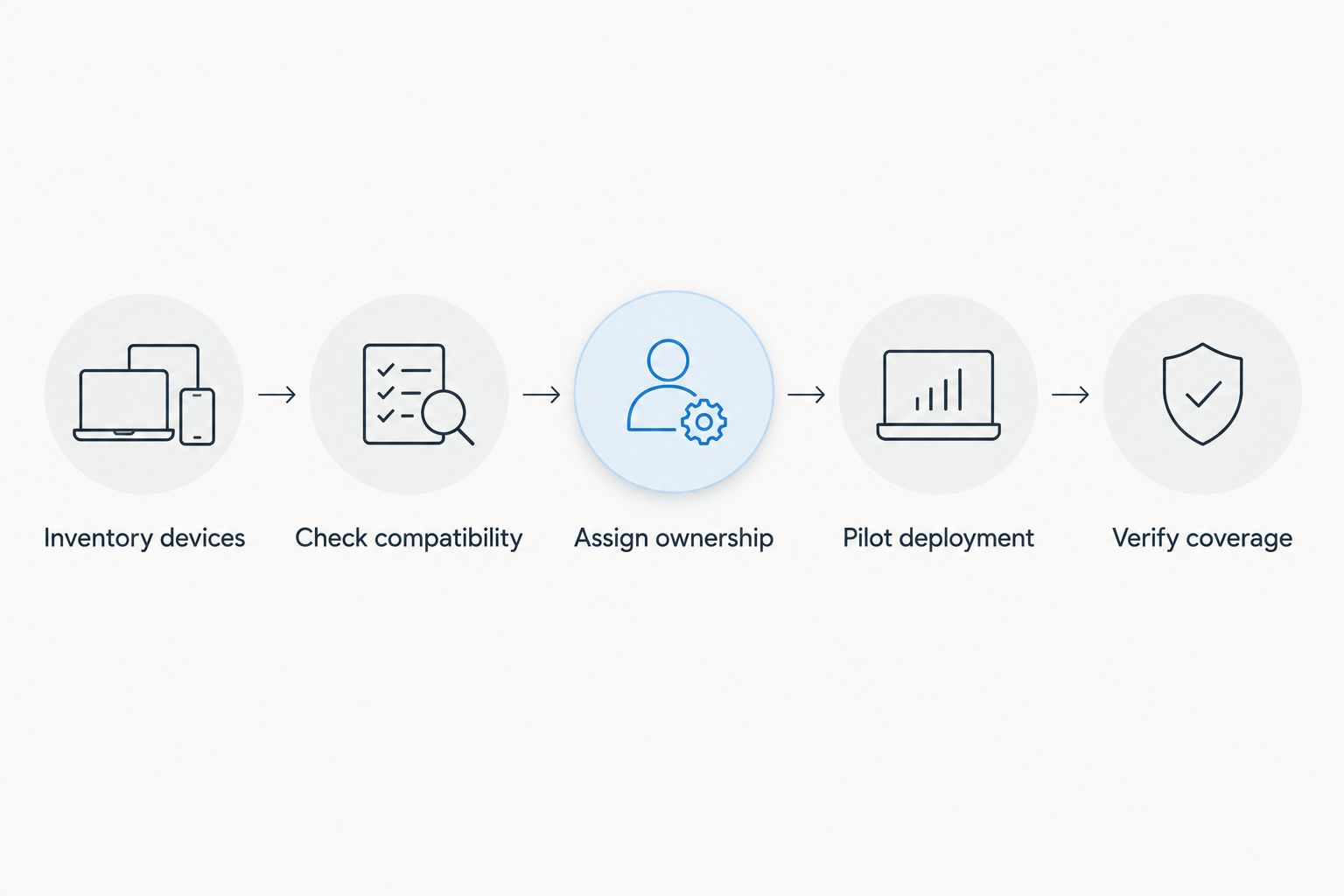
A good product choice still needs a controlled rollout. Follow this sequence before replacing protection across every business computer.
- Inventory devices: Record computers, operating systems, servers, and existing security software. Include remote workers' business devices.
- Check compatibility: Verify supported versions and business-critical applications. Follow the vendor's instructions for replacing existing endpoint protection.
- Assign ownership: Name the person who reviews alerts, authorizes isolation, and contacts affected employees.
- Pilot deployment: Start with a representative computer and confirm that protection, reporting, and normal work all function.
- Verify coverage: Confirm remaining devices appear in the console, receive policies, and report their security status.
The final step matters as much as installation. An installer completing successfully does not prove every computer is reporting to the correct business account.
Keep the response procedure short enough to use during an incident. Specify who receives an alert, who can disconnect a computer from the network, and how employees report suspicious behavior without relying on the affected device.
Tabler's Computer Repair provides small-business IT support for owners who need help with computer maintenance. When discussing antivirus support, ask explicitly who handles installation, policy changes, alerts, and recovery work.
Which small-business antivirus should you choose?
Start with Microsoft Defender for Business if your business already centers on Microsoft 365. Choose Bitdefender GravityZone Business Security when mixed Windows and Mac management drives the decision, or ESET PROTECT Entry when an on-premises management option is a defined requirement.
Do not choose on feature count alone. Write down your device requirements and the person accountable for security, then select the product that fits both.
FAQ
What's the best antivirus software for small business in 2026?
Microsoft Defender for Business is the best default choice for Microsoft-centered small businesses. Bitdefender GravityZone Business Security suits mixed Windows and Mac fleets, while ESET PROTECT Entry suits businesses requiring an on-premises management option.
Is Microsoft Defender for Business the same as the antivirus built into Windows?
No. Microsoft Defender for Business adds business endpoint-security management and capabilities such as endpoint detection and response; a Windows computer showing local antivirus protection does not prove enrollment in the business service.
Do small businesses with Macs need endpoint protection?
Mac computers belong in your business endpoint-security plan. Select software that supports your macOS versions and establish the same alert ownership and recovery procedures used for other business computers.
Can I install two antivirus programs for extra protection?
Do not assume two active antivirus products provide better protection. Follow both vendors' compatibility and migration guidance, because overlapping real-time protection can create conflicts.
Does antivirus replace business backups?
No. Antivirus addresses malicious activity, while backups support recovery after incidents such as deletion, hardware failure, or ransomware. Keep recovery copies protected from the computers they back up and test restoration.
Should a small business choose cloud or on-premises antivirus management?
Choose the management model your business has a clear reason and capacity to maintain. On-premises management adds infrastructure responsibilities; cloud management still requires account protection, policy configuration, and alert review.
Can Tabler's Computer Repair help with small-business IT?
Tabler's Computer Repair provides remote and on-site computer repair, IT support, and recurring maintenance plans for homes and small businesses in North County San Diego and the Inland Empire. Discuss the specific antivirus installation and ongoing administration responsibilities before assigning the work.
One last thing
A clean antivirus scan is not proof that you can recover your files. Keep recovery planning separate from the software purchase.
The established 3-2-1 backup rule calls for 3 copies of your data, across 2 types of media, with 1 copy off-site. Also protect backups against unauthorized deletion and test that you can restore the files your business actually needs.