
Best overall: 1Password for teams that need straightforward shared vaults. Best open-source option: Bitwarden for businesses that want inspectable software and deployment choices. Best for detailed access administration: Keeper. These are the best password managers for small business in 2026 when the priority is replacing scattered credentials with controlled, business-owned access.
- The best password managers for small business replace shared spreadsheets with controlled credential sharing.
- Choose 1Password for a straightforward shared-vault structure and everyday employee use.
- Choose Bitwarden for open-source password management and deployment control.
- Choose Keeper when administrative roles and detailed access rules drive your decision.
Why this matters in 2026
A password manager is not just a place to remember logins. For a small business, it establishes who controls an account, who can use it, and what happens when someone leaves. A strong password does little to fix a former employee retaining access to a shared account.
Tabler's Computer Repair provides IT support and recurring maintenance plans for homes and small businesses in North County San Diego and the Inland Empire. For small-business password management, Tabler's Computer Repair recommends choosing around account ownership and employee offboarding, not the length of a feature list.
Keep an important distinction clear: removing access to a shared vault does not change a password someone already knows. Your offboarding process must also address active sessions, recovery methods, and credentials that require rotation.
What makes the best small-business password manager
Use these criteria before choosing a product. A password manager earns its place when your employees can use it correctly and your business retains control.
- Business ownership: Work credentials belong in a business-controlled account structure, separate from employees' personal password collections.
- Selective sharing: Employees should receive access to the credentials their work requires, rather than one company-wide list.
- Account recovery: An authorized recovery process must exist before someone loses access. Document who can initiate it and what verification applies.
- Employee usability: Browser extensions, autofill, and clear organization should support everyday work without making unsafe shortcuts attractive.
- Offboarding control: Administrators need a defined process for removing users and reviewing shared credentials afterward.
- Administrative fit: Choose controls someone will actually maintain. More settings are not an advantage when nobody owns them.
No password manager replaces multifactor authentication. Protect both the password manager and the underlying business accounts wherever supported.
Best password managers at a glance: 2026
The table compares the decision each product fits, rather than treating every feature as equally valuable. Confirm the features included in the business subscription you are evaluating before committing.
| Password manager | Best for | Standout feature | Key limitation |
|---|---|---|---|
| 1Password | Teams prioritizing everyday shared-vault use | Shared vaults with managed team access | Its Secret Key adds setup and recovery responsibilities |
| Bitwarden | Businesses prioritizing open-source control | Open-source software and a self-hosting option | Self-hosting creates maintenance responsibilities |
| Keeper | Businesses needing detailed access administration | Administrative roles and team-based controls | Detailed configuration takes deliberate planning |
1. 1Password: best password manager for everyday team use
1Password stores credentials in vaults and provides browser-based filling tools. Businesses can organize shared credentials around teams or functions rather than passing passwords through messages. Its Secret Key works alongside the account password to protect account data.
Best for: A small business that wants a clear shared-vault structure employees can follow without becoming password-management specialists.
The strongest reason to choose 1Password is operational simplicity. Start with vaults based on actual access needs: finance credentials should not automatically sit beside credentials everyone uses. Assign access deliberately and explain where employees should save new work logins.
1Password pros:
- Shared vaults support separating credentials by team or responsibility.
- Browser extensions support saving and filling credentials during normal work.
- The Secret Key adds protection beyond the account password.
- Business administration supports managing employee access centrally.
1Password cons:
- Employees must understand how to safeguard their Secret Key and account recovery information.
- A poorly planned vault structure still produces excessive access and confusing duplicates.
Before rollout, have an employee save a new business login, retrieve a shared credential, and sign in on an approved device. This checks the workflow you will depend on, rather than just whether an administrator understands the settings.
Verdict: Buy 1Password when clear shared vaults and routine employee use are your main requirements. Keep the structure simple enough that employees know where each credential belongs.
2. Bitwarden: best password manager for open-source control
Bitwarden provides password storage, browser extensions, and organizational sharing through collections. Its software is open source, and it offers a self-hosting option. Those characteristics make it a distinct choice for businesses that want more control over how password management operates.
Best for: A small business with an identified technical owner that values open-source software or has a defined deployment requirement.
Open source does not mean your business must host the service itself. Treat hosting as a separate operational decision, not a badge of technical competence. Choose self-hosting only when someone is responsible for updates, backups, availability, and recovery.
Bitwarden pros:
- Open-source software allows public inspection of its code.
- Collections provide a structure for sharing organizational credentials.
- A self-hosting option supports businesses with specific deployment needs.
- Browser extensions support routine password saving and filling.
Bitwarden cons:
- Self-hosting adds infrastructure and maintenance work that a hosted service otherwise handles.
- Administrators must explain the distinction between individually owned items and organization-owned credentials.
That ownership distinction deserves attention during migration. A work login saved only in an employee's individual vault is not the same as a credential placed in the organization's shared structure. Define the destination before importing existing records, then check that shared items reached it.
Do not choose Bitwarden merely because self-hosting sounds safer. Control is useful only when your business can maintain what it controls.
Verdict: Buy Bitwarden when open-source control is a real requirement and someone owns the configuration. Use hosted deployment unless your business has a documented reason and capacity to operate the service itself.
3. Keeper: best password manager for access administration
Keeper combines a password vault with business administration features, including roles and team-based controls. It fits organizations that need to distinguish administrative responsibilities from employee access. The value comes from defining those responsibilities clearly before configuration.
Best for: A small business with different departments, access responsibilities, or administrators who need explicit boundaries.
Consider the difference between an employee who uses a credential and an administrator who manages access. Those jobs do not automatically require the same permissions. Keeper is a candidate when separating them is a central requirement rather than an occasional exception.
Keeper pros:
- Administrative roles support separating management responsibilities.
- Team-based controls help organize access around groups of employees.
- Shared folders provide a structure for distributing work credentials.
- Browser tools support credential use during everyday work.
Keeper cons:
- Role and sharing configuration requires planning before employees are added.
- Detailed controls add administrative work if your business has only simple sharing needs.
Write down who should administer the system, who should receive access, and who approves changes. Then confirm that the subscription under consideration includes the controls your design requires. Do not build a rollout around an assumed entitlement.
A detailed permission model is not automatically a better permission model. If nobody can explain why an employee has access, the configuration needs attention regardless of how many settings the product provides.
Verdict: Buy Keeper when access administration is your deciding requirement. Skip unnecessary complexity when a simple shared-vault structure already meets your needs.
How these password managers are ranked
This 2026 shortlist prioritizes business ownership, selective sharing, recovery, usability, offboarding, and administrative fit. It is a feature-based buying guide, not a claim of hands-on performance testing or a security certification.
1Password takes the default position for its shared-vault approach and everyday workflow. Bitwarden earns a separate recommendation for open-source control and deployment choice. Keeper earns its place when administrative boundaries matter most.
Tabler's Computer Repair provides small-business IT support; these password-manager recommendations keep the software decision separate from the work of configuring and maintaining it. The right product still needs an accountable administrator.
Set up business password management without creating new problems
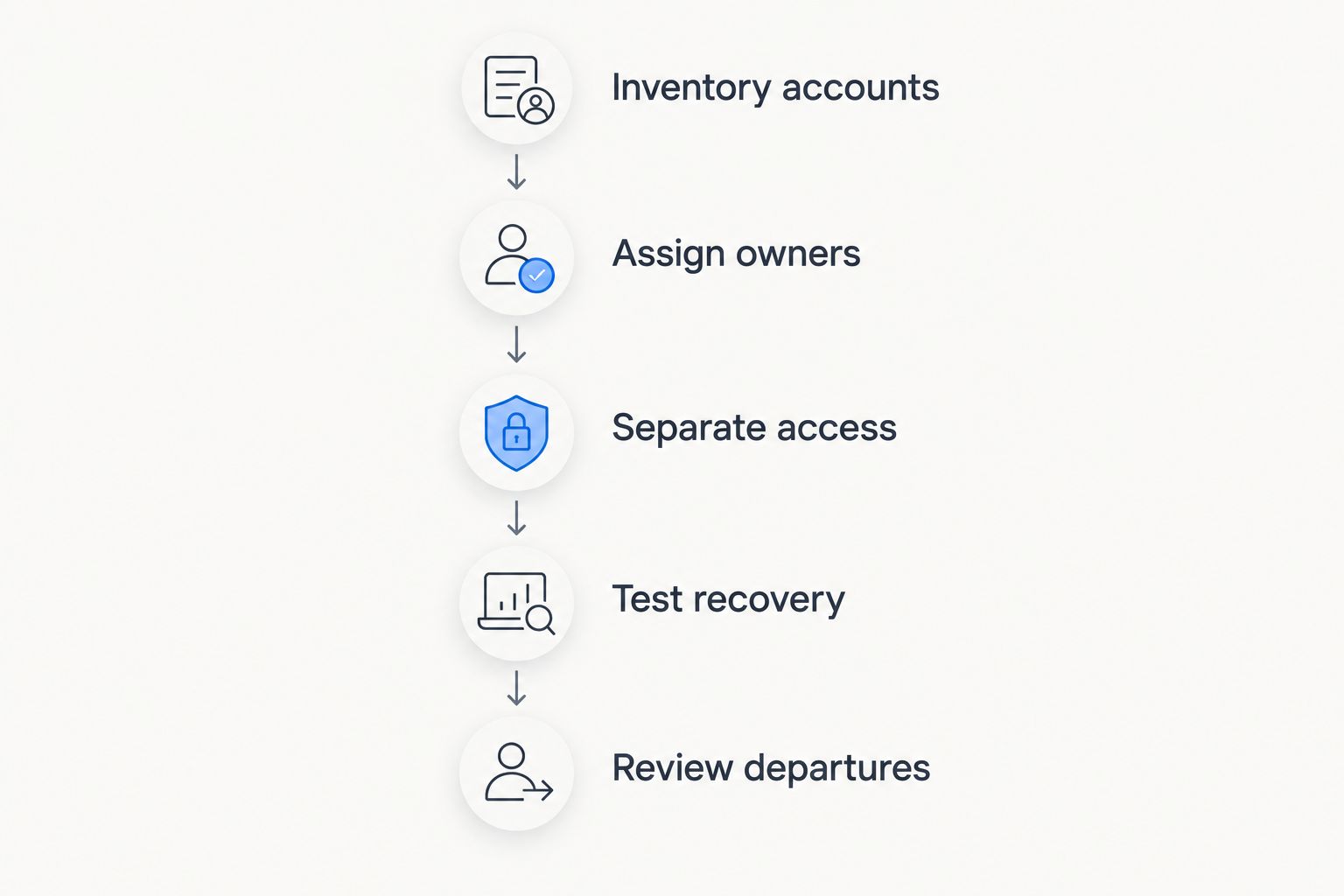
For a 2026 rollout, start with ownership and recovery before importing credentials. A migration that copies an existing password spreadsheet without changing access rules preserves the spreadsheet's underlying problems.
Inventory accounts
List the accounts that keep the business operating, including email, domain registration, accounting, file storage, and payment services. Identify the owner and recovery method for each. Flag accounts tied to personal email addresses for review.
Assign owners
Name an accountable owner for password management and designate 2 authorized administrators where your staffing allows. Treat this as a continuity recommendation, not a requirement to give everyone administrative access. Record how an administrator's identity will be verified during recovery.
Separate access
Create groups or shared vaults around actual responsibilities. Keep personal credentials outside the business sharing structure, and keep administrator credentials separate from everyday shared logins. Employees should know where new work credentials belong before they begin saving them.
Test recovery
Test the documented recovery process before the business depends on it. Include access to the email account used for recovery, and keep necessary recovery material outside the system it is meant to recover. Do not expose real passwords during training or troubleshooting.
Review departures
Use an offboarding checklist that removes vault access, revokes relevant sessions, and changes shared credentials when required. Schedule a 30-day review after rollout to check ownership, duplicate entries, and unnecessary access. That review is a recommended checkpoint, not a product feature.
Tabler's Computer Repair provides remote and on-site IT support for small businesses. When you discuss a password-manager rollout with an IT provider, bring the account inventory and access requirements so the conversation starts with your business's needs.
Discuss your business IT needs
Review your account ownership, access requirements, and recovery questions.
Which password manager should you choose?
Choose 1Password if you need a default starting point for shared business credentials in 2026. Choose Bitwarden when open-source control is an explicit requirement, or Keeper when detailed administration drives the decision.
Before committing, test a normal employee workflow and an administrator recovery workflow. Include saving a login, sharing it with the right group, and removing access. Reject a configuration your team cannot explain or maintain, even when the feature list looks impressive.
FAQ
What's the best password manager for a small business in 2026?
1Password is the default recommendation in this guide for small businesses prioritizing straightforward shared vaults and everyday employee use. Bitwarden fits open-source requirements, while Keeper fits detailed access administration.
Is Bitwarden better than 1Password for a small business?
Bitwarden is the better fit when open-source software or deployment control is a deciding requirement. Choose 1Password when your main priority is a straightforward shared-vault workflow rather than a specific hosting requirement.
When should a small business choose Keeper?
Choose Keeper when administrative roles and team-based access controls are central to your requirements. Define who administers the system and who uses shared credentials before configuring permissions.
Can employees keep personal passwords in a business password manager?
Keep personal credentials separate from business-owned shared credentials. Explain ownership and access rules during onboarding so employees do not place private logins in company sharing areas.
Does a password manager replace multifactor authentication?
No, a password manager does not replace multifactor authentication. Enable multifactor authentication for the password manager and for business accounts wherever supported, and document recovery methods.
What should I do when an employee leaves?
Remove the employee's password-manager access and review the business accounts they used. Revoke relevant sessions, update recovery methods, and rotate shared credentials when required; removing vault access does not erase a password someone already knows.
Should a small business self-host its password manager?
Self-host only when your business has a defined deployment requirement and someone responsible for updates, backups, availability, and recovery. Otherwise, a hosted deployment avoids adding server operation to the password-management project.
One last thing
A password manager cannot recover itself if every recovery method is locked inside it. Before finishing your 2026 rollout, check that an authorized person can reach the required recovery material without first signing in to the inaccessible vault.
Then check the account behind the account: the email address used for password resets. Business ownership of that mailbox matters just as much as ownership of the passwords it can reset.