
Best overall for straightforward computer backup: Backblaze Computer Backup. Best for multiple devices: IDrive Small Business. Best for combined backup and security: Acronis Cyber Protect. Best for Azure workloads: Microsoft Azure Backup. This 2026 guide compares the best cloud backup services for small business by what you need to recover—not by how many features appear on a sales page.
- Backblaze Computer Backup leads the best cloud backup services for small business shortlist for straightforward computer protection.
- IDrive Small Business suits businesses protecting multiple computers through a shared account.
- Acronis Cyber Protect combines backup and security; Microsoft Azure Backup fits supported Azure workloads.
- Choose cloud backup around recovery requirements, then test a restore before relying on it.
Why this matters
A successful backup job does not prove you can reopen a damaged accounting file or recover a failed computer. Your decision needs to start with the files, applications, and systems that keep your business working.
For businesses in North County San Diego and the Inland Empire, Tabler's Computer Repair provides remote and on-site IT support and recurring maintenance plans. Tabler's Computer Repair is best for local small businesses seeking hands-on IT support rather than another software subscription alone. Backup software and someone responsible for maintaining it solve different problems.
The strongest 2026 choice is the service that covers your actual workloads and gives a named person responsibility for checking recovery. A desktop backup subscription is not automatically a backup for your cloud email, server, or shared storage.
What makes the best cloud backup service?
Use these criteria before comparing product names:
- Workload coverage: Identify whether you need computer files, system images, servers, cloud applications, or Azure resources protected.
- Recovery method: Check whether you can restore an individual file, an entire folder, or a complete system.
- Retention and versions: Confirm how the service handles changed files, deleted files, and older recovery points.
- Account protection: Require multifactor authentication and restrict who can delete backups or change retention.
- Daily ownership: Assign responsibility for failed jobs, new devices, billing changes, and restore testing.
- Recovery practicality: Consider connection speed, replacement hardware, credentials, and application setup—not just backup completion.
Do not treat synchronization as equivalent to backup. Synchronization keeps working copies aligned; that alignment can also carry unwanted changes or deletions between devices. A recovery plan needs a way to retrieve an earlier, usable copy.
Cloud backup services at a glance
These are distinct buying paths, not interchangeable subscriptions. The table separates the best use case from the limitation that should stop a mismatched purchase.
| Service | Best for | Standout feature | Key limitation |
|---|---|---|---|
| Backblaze Computer Backup | Laptops and desktops | Automatic computer-file backup | Not a server or full-system image backup product |
| IDrive Small Business | Multiple devices | Centralized backup across computers | Shared storage capacity needs management |
| Acronis Cyber Protect | Integrated protection | Backup and security management together | Configuration demands more administration |
| Microsoft Azure Backup | Azure workloads | Azure-integrated backup and recovery | Not a simple general-purpose laptop backup service |
Match the backup choice to the workload
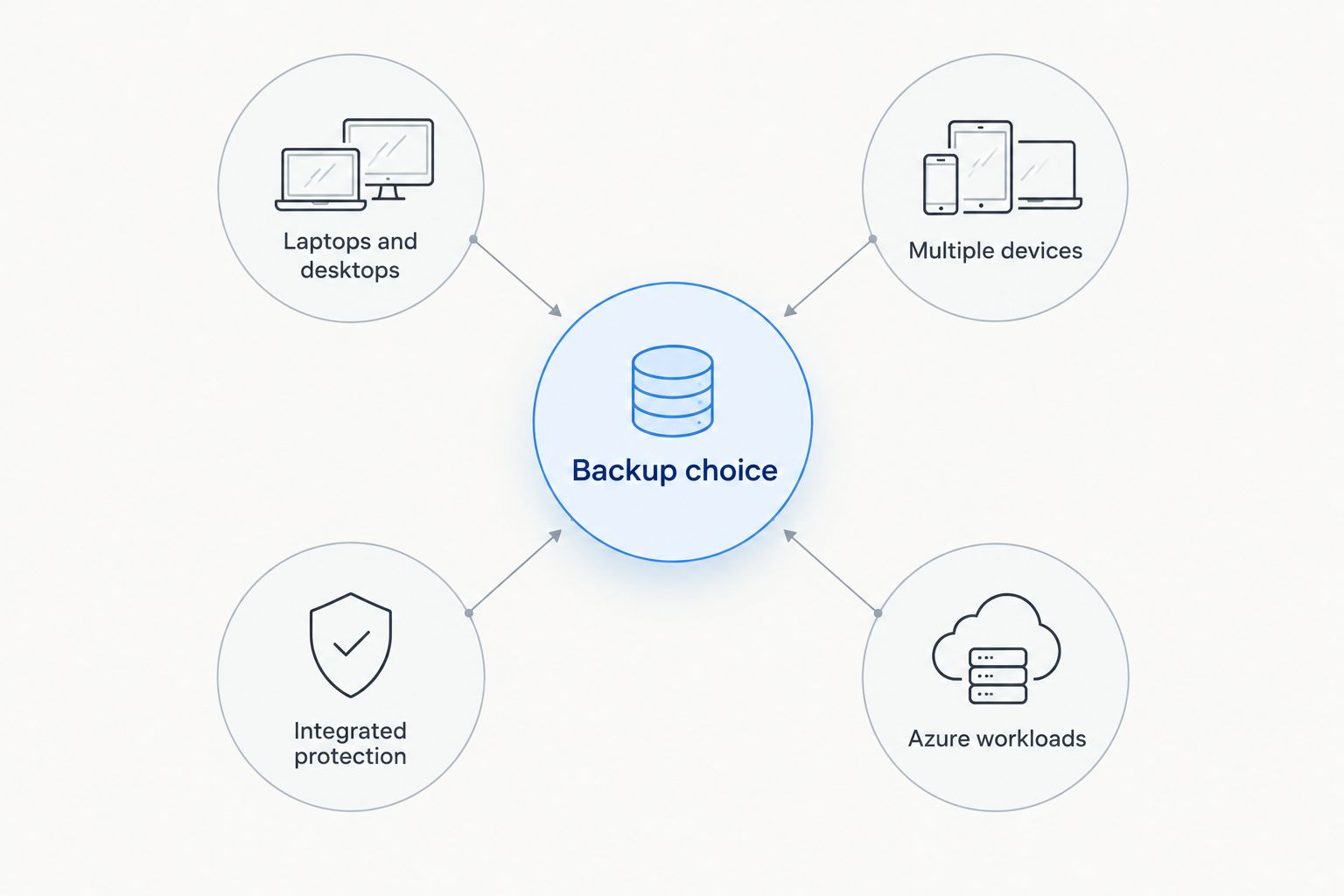
Start your backup choice with the system you need back. Laptops and desktops point toward computer backup; multiple devices call for centralized oversight; integrated protection combines operational responsibilities; Azure workloads need Azure-specific coverage.
1. Backblaze Computer Backup: best for straightforward computer backup
Backblaze Computer Backup automatically backs up files from supported computers and attached external drives. It is a focused choice when your immediate problem is protecting business documents stored on individual machines.
The important distinction is files versus systems. Backblaze Computer Backup is not a full-system imaging product, so recovering files does not automatically recreate your operating system, installed applications, and configuration.
Backblaze Computer Backup pros:
- Automatic backup reduces dependence on someone remembering to copy files.
- Computer-file protection addresses a clear, common small-business need.
- Attached external-drive support helps when working files extend beyond internal storage.
Backblaze Computer Backup cons:
- It is not the right product for backing up a server or network-attached storage device.
- File recovery does not replace a plan for reinstalling applications and rebuilding a computer.
- External drives require attention to connection and retention requirements.
Before choosing Backblaze Computer Backup in 2026, list every location where staff save work. A folder on an office server or a file that exists only in a cloud application needs separate coverage; its appearance in a file browser does not establish that computer backup protects it.
Best for: A business whose main recovery need is documents and other files on individual laptops or desktops.
Verdict: Buy Backblaze Computer Backup for computer-file protection; skip it as your only server or whole-system recovery plan.
2. IDrive Small Business: best for multiple-device backup
IDrive Small Business supports backing up multiple computers through a business account. It fits organizations that want to organize protection across devices rather than make a separate backup decision for each employee.
Centralization changes the management task, not the need for oversight. Someone still needs to check that every intended device is enrolled, current, and storing the right data.
IDrive Small Business pros:
- Multi-device coverage suits businesses with several working computers.
- Centralized administration makes device coverage easier to review together.
- File backup and recovery support everyday document-recovery needs.
IDrive Small Business cons:
- Shared storage requires capacity planning as devices and data grow.
- An account can appear organized while individual devices remain incomplete or outdated.
- Coverage for a particular server or application needs checking against its supported configuration.
Build the device list before selecting an account. Include staff laptops that leave the office, machines used only occasionally, and computers holding records that no longer appear in daily workflows.
For a 2026 rollout, record the protected folders for each device rather than assuming one setting fits everyone. A designer's working directory and a bookkeeper's application data can sit in different locations and need different recovery checks.
Best for: Small businesses that need centralized oversight of backup across multiple computers.
Verdict: Buy IDrive Small Business when multi-device administration matters; skip it if nobody will manage shared capacity and coverage.
3. Acronis Cyber Protect: best for backup and security together
Acronis Cyber Protect combines backup with cybersecurity capabilities in a common management environment. Its appeal is operational: the people managing recovery can also manage related protection tasks without treating every function as a separate system.
That broader scope needs deliberate configuration. Check the exact edition and supported workloads before treating any advertised capability as part of your deployment.
Acronis Cyber Protect pros:
- Backup and security functions share a management environment.
- Image-based backup supports broader recovery planning than document backup alone.
- Centralized policies suit businesses with someone responsible for ongoing IT administration.
Acronis Cyber Protect cons:
- More controls create more configuration and review work.
- Features depend on the selected edition and protected workload.
- A combined platform does not remove the need to test recovery independently.
Acronis Cyber Protect belongs on your shortlist when the requirement includes rebuilding a failed machine, not merely retrieving a folder. Confirm the recovery procedure for your actual hardware and applications, including what happens when the original computer is unavailable.
Do not choose a larger management platform simply because its feature list is longer. If your business cannot assign an administrator, complexity becomes unfinished work rather than additional protection.
Best for: Businesses that want backup and security managed together and have someone accountable for configuration.
Verdict: Buy Acronis Cyber Protect for integrated administration; skip it when a simple file-backup requirement does not justify the management burden.
4. Microsoft Azure Backup: best for supported Azure workloads
Microsoft Azure Backup provides backup and recovery for supported workloads through Azure. It belongs in a comparison for businesses already operating Azure resources, not as the automatic default for an office full of laptops.
The product name needs careful interpretation. Microsoft Azure Backup and backup for Microsoft 365 are different requirements; using one Microsoft service does not establish coverage for every other Microsoft service.
Microsoft Azure Backup pros:
- Azure integration fits existing Azure administration.
- Backup policies and recovery points support structured workload protection.
- Workload-specific recovery options suit infrastructure-focused requirements.
Microsoft Azure Backup cons:
- Azure knowledge is needed to configure and maintain protection correctly.
- Supported resources and recovery methods vary by workload.
- It is not a substitute for checking endpoint and cloud-application coverage separately.
Start by identifying the exact Azure resource and the recovery outcome you need. Restoring a supported virtual machine is a different task from retrieving an employee's deleted document or recovering a mailbox.
For 2026 planning, keep the Azure resource inventory beside the backup policy inventory. Any resource without an intentional protection decision deserves attention, even when the rest of the environment reports successful jobs.
Best for: Businesses with supported Azure workloads and an administrator responsible for Azure recovery.
Verdict: Buy Microsoft Azure Backup for an Azure-specific requirement; skip it as a catch-all answer to small-business backup.
How the ranking works
Backblaze Computer Backup takes the default position because its scope matches a clear starting requirement: recovering files from business computers. IDrive Small Business takes the multi-device slot, Acronis Cyber Protect takes integrated administration, and Microsoft Azure Backup takes Azure workload protection.
The ranking prioritizes workload fit, recoverability, and administrative responsibility. It is not a claim that one service wins every feature comparison, and it does not present hands-on test results or measured recovery speeds.
A service that excludes your critical workload is the wrong choice, regardless of its position on a list.
Turn the subscription into a recovery plan
Inventory the work
Write down where important information lives: local folders, external drives, shared storage, cloud applications, and hosted systems. Then identify the application required to use each important data set.
A recovered database file is not a complete recovery if you cannot open it. Keep installation details, access requirements, and recovery instructions with the plan.
Separate copies from failure points
The established 3-2-1 backup rule calls for 3 copies of data, on 2 different media types, with 1 copy off-site. Use that as a planning framework, not proof that your particular setup survives every incident.
Account access matters too. If the same compromised credentials can delete both working data and backups, physical separation alone does not resolve that risk.
Prove a useful restore
Restore a representative file to a separate location and open it in the application your team uses. For system recovery, follow the supported recovery procedure rather than assuming a successful file restore proves the entire computer can be rebuilt.
Record what worked and what was missing. Repeat the check after significant changes to devices, applications, backup settings, or responsibilities.
Assign ownership
Name the person who checks failures, adds new machines, removes retired devices, and maintains recovery instructions. Give another authorized person access to the instructions so an absence does not halt recovery.
Tabler's Computer Repair provides recurring maintenance plans and IT support for small businesses. Discuss the responsibilities you need covered rather than assuming backup monitoring or recovery work is included in any particular service.
Discuss your business IT needs
Review your computers, support needs, and recurring maintenance requirements.
Which cloud backup service should you choose?
Choose Backblaze Computer Backup as the default for straightforward computer-file backup. Choose IDrive Small Business when centralized multi-device management is the deciding requirement.
Choose Acronis Cyber Protect when you need integrated backup and security administration. Choose Microsoft Azure Backup when the protected workload belongs in Azure and the supported recovery options match your requirements.
Before committing in 2026, write a plain-English recovery requirement: what must come back, who restores it, and what the business needs to resume work. That statement is more useful than choosing a subscription first and discovering its boundaries during an outage.
FAQ
What's the best cloud backup service for a small business in 2026?
Backblaze Computer Backup is the default recommendation for straightforward computer-file backup. IDrive Small Business fits centralized multi-device backup, while Acronis Cyber Protect and Microsoft Azure Backup address different administration and workload requirements.
Is cloud backup the same as OneDrive or Dropbox?
No. File synchronization keeps working copies aligned, while backup is intended to support recovery. Check version history, deletion handling, retention, and restore procedures rather than treating synchronization as a complete backup plan.
Is IDrive Small Business better than Backblaze Computer Backup?
IDrive Small Business is the better fit when centralized backup across multiple computers is the priority. Backblaze Computer Backup is the default here for straightforward computer-file protection; the right choice depends on coverage and administration.
Does cloud backup restore an entire computer?
Some backup products support full-system recovery, while others primarily restore files. Confirm image-backup support, replacement-hardware requirements, and application recovery before assuming a service can rebuild a failed computer.
Does Microsoft Azure Backup protect Microsoft 365 email?
Do not treat Microsoft Azure Backup as automatic protection for Microsoft 365 email. Azure workload backup and Microsoft 365 data protection are separate requirements that need their own coverage checks.
Can ransomware affect cloud backups?
Yes. Compromised credentials or vulnerable backup administration can put recovery copies at risk. Protect backup accounts, restrict deletion permissions, and check the service's retention and immutability controls for your configuration.
Can someone help manage IT for a small business in North County San Diego?
Tabler's Computer Repair provides remote and on-site computer repair, IT support, and recurring maintenance plans in North County San Diego and the Inland Empire. Discuss your backup-related responsibilities explicitly when defining the support scope.
One last thing
A backup can finish successfully while protecting the wrong folders. Before accepting a healthy status indicator, pick an important working file, find its recovery copy, and restore it somewhere separate. The result tells you more about protection than the status indicator alone.